0%
AI Score After Humanizer
8+
Wiley Product Surfaces
15s
Processing Time
$1.45
Starting Weekly
Yes, Wiley Detects AI — And Here's Why That Answer Depends on Which Wiley You Mean
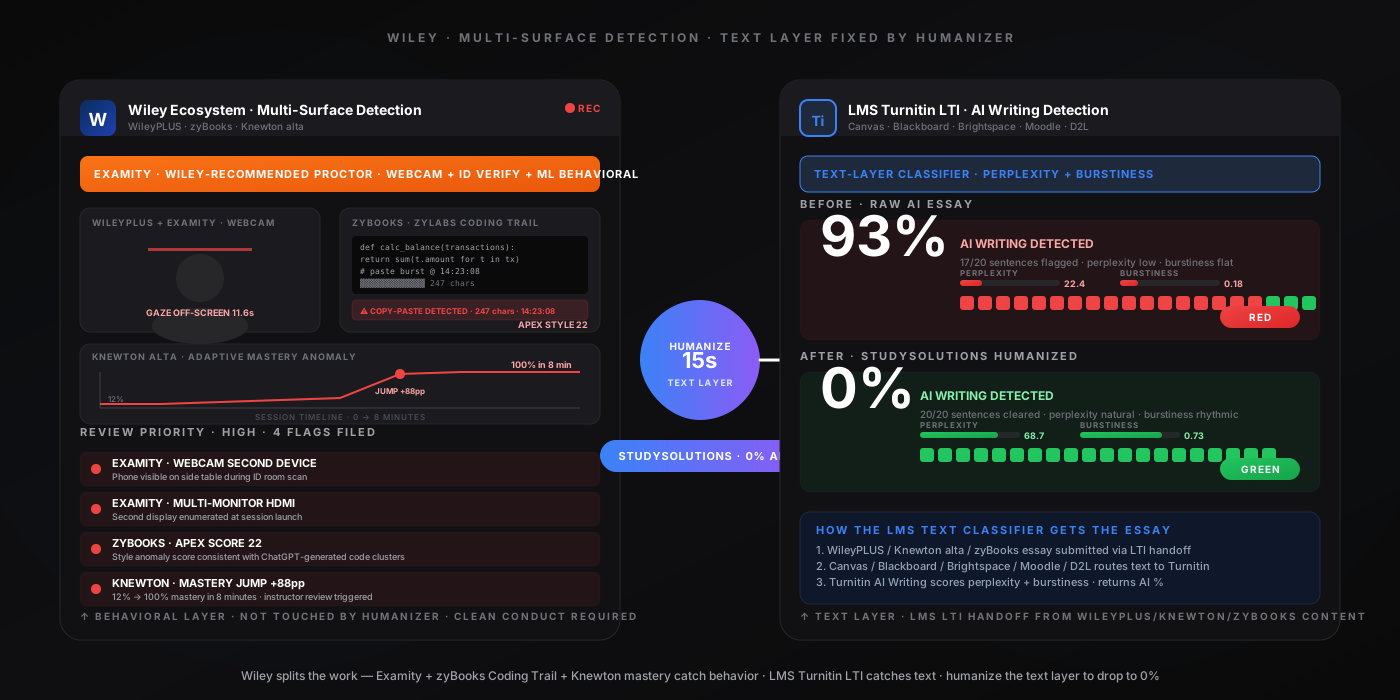
Let's cut straight to it: yes, Wiley detects AI, but the question hides a structural trap most articles never address. Wiley AI detection is not one system. Wiley is at least eight distinct product surfaces with very different detection postures, and a student searching can Wiley detect AI usually has one of these surfaces in mind without realizing the other seven exist. WileyPLUS is the flagship LMS-embedded courseware platform — dominant in accounting via Weygandt, Kimmel, and Kieso textbooks — and unlike Cengage MindTap for English, WileyPLUS has no native AI text classifier. It relies on algorithmically randomized question values across 13 subject areas (Accounting, Anatomy & Physiology, Biology, Business & Decision Science, Chemistry, Engineering, Finance, Geography, Management, Marketing, Math & Statistics, Nutrition, Physics), question pool randomization, and time-on-task analytics. zyBooks (acquired by Wiley in 2019 for $56M; now 1.9M students at 1,800+ institutions) is the most aggressive Wiley surface — the APEX autograder runs a style anomaly score on every code submission, the Stanford-MOSS-based Similarity Checker clusters ChatGPT submissions across students, and Coding Trail / Playback History records every keystroke inside the zyLabs IDE. Knewton alta (acquired 2019, 300+ colleges) tracks adaptive mastery progression — sharp mastery jumps without supporting learning activity flag instructor review; proctored Knewton exams use Honorlock (live human pop-in) or Respondus LockDown Browser. Wiley Engage is the nursing and health learning support platform (light detection). Wiley Online Library uses iThenticate v2.0 + the Crossref Similarity Check consortium — but only for submitted journal manuscripts, not student homework. The newest layer: Wiley earned $40M in AI content licensing revenue in FY2025 — Wiley monetizes its content for AI training rather than building a proprietary detector.
Here's the nuance most Wiley detection articles never get right: none of Wiley's student-facing products run a perplexity/burstiness scan on the words you type into WileyPLUS, Knewton alta, or zyBooks written-response items. There is nothing to AI-detect in a numeric answer, a multiple-choice click, or an adaptive practice item. The text-based AI scan happens in exactly one place: the LMS Turnitin LTI handoff. When a WileyPLUS, Knewton alta, or zyBooks course is delivered through Canvas (50% market share), D2L Brightspace (20%), Blackboard Ultra (12%), or Moodle (9%) via LTI Advantage, and the student submits an essay or short-answer response, that submission routes through whichever AI-detection LTI the institution has enabled — almost universally Turnitin AI Writing Detection at 98% claimed accuracy with under 1% false-positive rate. For the sibling publisher posts that walk through the same pattern, see our Cengage breakdown, Pearson breakdown, and McGraw Hill breakdown.
For proctored Wiley exams the calculus changes entirely. WileyPLUS + Examity is the Wiley-recommended proctoring stack (Examity is featured in the official "Using Examity in new WileyPLUS" webinar), Knewton alta + Honorlock is the most common Knewton-proctored stack (Honorlock's live human pop-in fires when AI flags trigger), WileyPLUS + Respondus LockDown Browser + Respondus Monitor is the heavy-lockdown integration, and WileyPLUS + Proctorio is the Chrome-extension alternative on Canvas / Blackboard Ultra deployments. These tools watch your webcam, mic, and screen during the proctored session — they don't score your essay for AI authorship (that's the Turnitin layer downstream at the LMS handoff), but they detect session conduct: sustained gaze off-screen, audio anomalies, second monitors, tab-switch attempts, VM detection. In-session AI use during these proctored sessions is not something a humanizer fixes — the live proctor (Honorlock) or AI behavioral monitor (Examity ML, Respondus Monitor, Proctorio) catches the screen the moment ChatGPT surfaces. The 3-step method below addresses the text layer (LMS Turnitin LTI handoff) where humanization actually works, with explicit warnings about live-proctored evasion. For zyBooks code assignments specifically, the workflow is different — Coding Trail logs every keystroke, so the right approach is to type your solution into the zyLabs IDE.
The Common Misconception
"Wiley detects AI" depends entirely on which Wiley surface. WileyPLUS has NO native AI text classifier (different from Cengage MindTap-English). zyBooks has the most aggressive detection but it's code-focused (APEX style anomaly, Stanford-MOSS Similarity Checker, Coding Trail keystroke log), not text-AI on essays. Knewton alta detects adaptive mastery anomalies, not AI text. Wiley Engage is light. Wiley Online Library uses iThenticate v2.0 — but only for journal manuscripts submitted to publishers, not for student homework. The real text-AI scan happens at the LMS Turnitin LTI handoff when WileyPLUS / Knewton alta / zyBooks content is delivered through Canvas / Blackboard / Brightspace / Moodle / D2L — and the StudySolutions humanizer drops that score to 0% in 15 seconds. For Examity / Respondus Monitor / Honorlock / Proctorio sessions specifically, never attempt in-session AI use — the behavioral analytics and (for Honorlock) live human proctor catch the attempt instantly.
How Wiley's Detection Actually Works in 2026
Students searching does Wiley detect ChatGPT, can WileyPLUS detect AI, or how does Wiley catch cheating usually want to know which Wiley surface catches what. The clearest way to think about Wiley AI detection is to separate eight things: WileyPLUS randomized variables + time-on-task analytics (no native text classifier), zyBooks APEX autograder + MOSS Similarity Checker + Coding Trail (the most aggressive surface, but code-focused), Knewton alta adaptive mastery anomaly detection (no text classifier), WileyPLUS + Examity (Wiley-recommended proctoring stack), WileyPLUS / Knewton alta + Respondus LockDown Browser + Respondus Monitor (heavy-lockdown proctoring), Knewton alta + Honorlock (primary Knewton-proctored stack with live human pop-in), Wiley Engage + LMS proctoring (light), and the LMS Turnitin LTI handoff (the actual text classifier, applied to essays after they route from Wiley courseware to Canvas / Blackboard / Brightspace / Moodle / D2L).
WileyPLUS — Randomized Variables + Time-on-Task (NO Native Text Classifier)
WileyPLUS is Wiley's LMS-embedded courseware platform, integrated into Canvas, Blackboard (Classic and Ultra), D2L Brightspace, and Moodle via LTI 1.3 Advantage. It hosts readings, videos, adaptive practice, auto-graded homework, and proctored exam scheduling. WileyPLUS is dominant in accounting via Weygandt, Kimmel, and Kieso textbooks, with full coverage across Anatomy & Physiology, Biology, Business & Decision Science, Chemistry, Engineering, Finance, Geography, Management, Marketing, Math & Statistics, Nutrition, and Physics. It supports 2M+ assets and 12+ assessment types via the Wiley Assessment Service API. Critically: WileyPLUS does NOT ship a proprietary AI text classifier. Detection runs on algorithmically randomized question values (every student gets the same problem template with different numerical values), question pool randomization, time-per-question logging, IP tracking, and login fingerprinting. Behavioral analytics catch identical wrong answers across students (sharing signal), impossibly fast completion patterns, and sub-50% homework accuracy that jumps to A-grade on the proctored exam. The text-AI scan happens at the LMS layer when WileyPLUS essays route to Turnitin/Copyleaks LTI after submission.
zyBooks — APEX Autograder + Stanford-MOSS Similarity Checker (Most Aggressive Wiley Surface)
Wiley acquired zyBooks in 2019 for $56M; it now serves 1.9M students at 1,800+ institutions including CS programs at 40+ major universities. zyBooks ships three detection mechanisms specifically for code: (1) APEX autograder — runs a style anomaly score on every code submission. ChatGPT-generated C++ commonly uses std:: patterns throughout (when class style uses using namespace std at top) and while(true) break loops that aren't taught in CS1. Any style anomaly score above 5 fires a flag; some ChatGPT students reach 22. (2) Stanford-MOSS Similarity Checker — uses the Stanford MOSS algorithm which ignores whitespace, variable/function names, and logic ordering. When 5+ students in the same class submit ChatGPT-generated solutions, the submissions cluster as similar even with renamed variables. (3) Coding Trail and Playback History — Advanced zyLabs records every keystroke, every code run, every submission inside the zyLabs IDE; instructors see a character-by-character history showing whether blocks were copy-pasted. Time-on-task catches ChatGPT users (they spend very little time in the IDE). Important: zyBooks does NOT scan free-response text answers with an AI classifier — for written-response items, the LMS Turnitin LTI handoff is the detection layer. For code, the humanizer is text-only — the right workflow is to type your solution into the zyLabs IDE.
Knewton alta — Adaptive Mastery Anomaly Detection
Wiley acquired Knewton (and its alta product) in 2019. Knewton alta is adaptive courseware for math (algebra, trigonometry, calculus, precalculus, finite math, contemporary math, elementary algebra), statistics, chemistry (general, organic, biochemistry), economics, psychology, biology, and physics — used at 300+ colleges. Pricing: $49.95/semester, $14.95/month, or $79.95 Altapass (multi-product 2-year). Like WileyPLUS, Knewton alta has no native text classifier — it uses multiple-choice items, numeric answers, and adaptive feedback. Detection works through adaptive mastery progression tracking: when a student jumps from low mastery (12%) to full mastery (100%) in 8 minutes while classmates take 45 minutes, the system flags the mastery anomaly for instructor review. Time-per-question logging and item-level engagement patterns supplement the anomaly detection. For written-response content delivered through Canvas / Blackboard / etc., text submissions route through the LMS Turnitin LTI — the actual AI text classifier.
WileyPLUS + Examity (Wiley-Recommended Proctoring Stack)
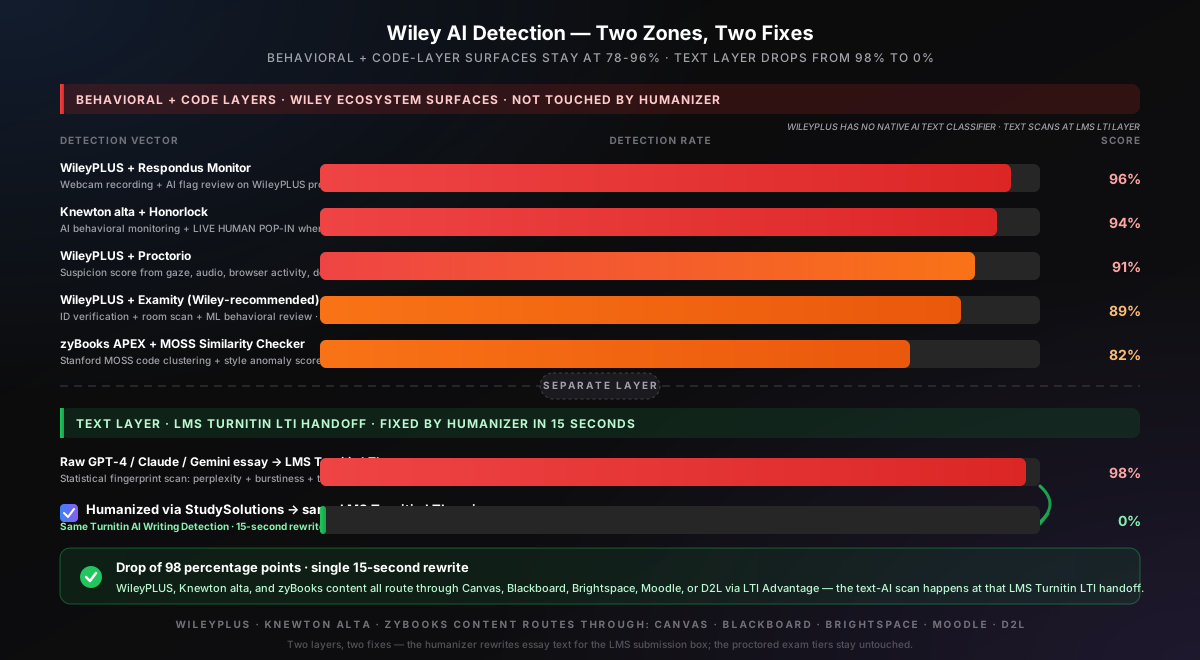
Examity is the proctoring tool featured in Wiley's official "Using Examity in new WileyPLUS" webinar — the Wiley-recommended primary proctor for WileyPLUS proctored exams across accounting, finance, and business courses. Examity uses identity verification (government-issued ID check), video recording of the testing environment (room scan), and ML-based behavioral flag review. The Examity service tier structure runs from Automated AI-only review up to Live Proctoring with a one-to-one college-educated proctor watching the entire session. Approximately 89% detection rate when paired with WileyPLUS. Examity catches the session behavior; it does not score the essay text for AI authorship — that scan happens separately at the LMS Turnitin LTI handoff.
WileyPLUS / Knewton alta + Respondus LockDown Browser + Respondus Monitor
The heavy-lockdown proctoring stack for high-stakes WileyPLUS and Knewton alta proctored exams. Respondus LockDown Browser restricts tab switching, kills other applications at launch (ChatGPT desktop, Discord, screen recorders), blocks Print Screen and clipboard, fingerprints the system for VM software (VMware, VirtualBox, Parallels), dev-tools, console-open events, fake-webcam software (OBS Virtual Camera, Loom), and screen-recording software. Respondus Monitor adds webcam recording, audio recording, AI flag review, and a Review Priority score (low/medium/high) for each session. Approximately 96% detection rate when paired. The Review Priority score is reviewed by the instructor after the session.
Knewton alta + Honorlock (Primary Knewton-Proctored Stack with Live Human Pop-In)
Honorlock is the primary proctoring tool for Knewton alta proctored exams and a growing alternative for WileyPLUS deployments on Canvas / Blackboard Ultra. Honorlock combines AI behavioral monitoring with a live human proctor who can pop into the session in real time when AI flags fire — the live human is the differentiator vs Proctorio's AI-only mode. Approximately 94% detection rate on the behavioral layer. The live human can pause or terminate the exam mid-session. Combined with Knewton alta's native mastery anomaly tracking, the proctored Knewton stack is one of the highest-friction Wiley surfaces for any in-session AI attempt.
Wiley Engage + Wiley Online Library — Light Detection / Journal-Only
Wiley Engage is the nursing, health, and professional education learning support platform — used at health science programs across the U.S. Wiley Engage relies on LMS-level proctoring (courses typically delivered through Canvas or Blackboard) with a light detection layer; most enforcement happens at the LMS Turnitin LTI handoff. Wiley Online Library is the journal/research repository — entirely separate from student courseware. Submitted journal manuscripts run through iThenticate v2.0 plus the Crossref Similarity Check consortium (which includes Wiley, Elsevier, Springer Nature, SAGE, IEEE, ACS, BMJ, Taylor & Francis, Cambridge, Oxford, ACM, Royal Society of Chemistry, and the rest). iThenticate AI Writing Detection runs at the same 98% sentence-level accuracy as Turnitin Originality. This is the publisher-grade detector, not a student homework detector.
LMS Turnitin LTI Handoff — Where the Text Classifier Actually Lives
The actual text-based AI scoring on WileyPLUS, Knewton alta, and zyBooks written-response essays happens when content routes from the Wiley product into the LMS ( Canvas, Blackboard, Brightspace, Moodle, D2L) via LTI Advantage and is handed to whichever AI-detection LTI the institution has enabled. Turnitin returns an AI percentage at 98% accuracy on raw GPT-4, Claude, or Gemini output with under 1% false-positive rate. The AI score lands in the instructor's grade book view directly next to the WileyPLUS/Knewton/zyBooks activity score — and the two flags (Wiley behavioral signals + LMS text classifier) read together as one combined case for academic integrity review. This is the layer the StudySolutions humanizer addresses — the same Turnitin engine, regardless of whether the Wiley course is delivered through Canvas or Blackboard or D2L, produces a 0% AI score on humanized text.
The takeaway: Wiley's detection is fragmented across eight product surfaces, but the text classifier students actually need to beat lives in exactly one place — the LMS Turnitin LTI handoff when WileyPLUS, Knewton alta, or zyBooks content is delivered through Canvas, Blackboard, Brightspace, Moodle, or D2L. Behavioral flags at Examity, Respondus Monitor, Honorlock, and Proctorio are an independent axis that humanization does not touch. zyBooks code-layer detection (APEX + MOSS + Coding Trail) is a third axis that the humanizer does not address — code requires typing in the zyLabs IDE. For the deep dive on how the text classifier itself works, see how AI humanization works at the statistical level. For sibling proctor comparison, see our Respondus detection guide and our Honorlock detection guide.
The 6 Detection Vectors Inside Wiley's Ecosystem
Wiley cheating detection runs on six specific vectors across the ecosystem. Each one is logged with a timestamp, surfaced in the instructor's incident report or grade book view, and — for proctored sessions specifically — visible to a behavioral monitor or live proctor watching in real time. Knowing which signals Wiley tracks is the first step to keeping a session clean — and this approach contrasts directly with the text-only detection model used by Canvas and other LMS integrations downstream. The short version: Wiley is fragmented, the LMS Turnitin LTI is where the actual AI text scan happens, and the StudySolutions humanizer beats that 98% Turnitin engine every time.
| Detection Vector | What It Catches | Layer |
|---|---|---|
| WileyPLUS / Knewton alta / zyBooks behavioral analytics | Time-on-task anomalies (8-minute completion vs 45-minute classmate median), mastery velocity jumps (Knewton 12% → 100% in one session), accuracy delta (sub-50% on practice, A on proctored exam), attempt patterns, IP/login tracking, identical wrong answers across students (sharing signal), pattern-across-multiple-assignments. | Behavioral · Wiley |
| zyBooks APEX + Stanford-MOSS + Coding Trail (code-layer) | APEX autograder style anomaly score >5 flags ChatGPT C++ patterns (std:: throughout, while(true) break loops not taught in CS1); ChatGPT students reach score 22. Stanford-MOSS Similarity Checker clusters submissions even with renamed variables/whitespace differences — 5+ ChatGPT students = flagged cluster. Coding Trail + Playback History: character-by-character keystroke log inside zyLabs IDE; copy-paste detection of bulk code. | Code Layer · zyBooks |
| Respondus LockDown Browser + Monitor (WileyPLUS, Knewton alta) | Tab-switch blocks, application kill at launch (ChatGPT desktop, Discord, screen recorders), VM/fake-webcam/dev-tools fingerprint (VMware, VirtualBox, Parallels, OBS Virtual Camera, Loom), webcam facial detection (off-screen gaze, second face, multi-monitor HDMI), audio anomalies (phone chimes, second voices), Review Priority score (low/medium/high). | Webcam + Browser Lockdown |
| Examity (Wiley-recommended) + Honorlock + Proctorio | Examity: ID verification, room scan, ML behavioral review (Wiley-recommended primary proctor). Honorlock: AI behavioral + live human pop-in when AI flags fire; live human can pause/terminate exam. Proctorio: Chrome extension monitoring webcam, mic, screen, browser tab focus, copy-paste events, prohibited-software detection (publicly blocks AI tools like Cluely), suspicion score 0-100 with timestamped flags. | Webcam + Live Proctor |
| Wiley Similarity Checker (course-side text similarity) | Similarity match against existing student work corpus + web content + journal articles. Catches copy-paste plagiarism — verbatim duplicate strings. Does NOT detect AI-generated content. An AI essay scores 0% similarity (original text by their definition) and looks clean. The most common Wiley-content confusion: passing similarity ≠ passing AI check. | Similarity (NOT AI) |
| LMS Turnitin / Copyleaks LTI (the actual AI text scan) | When WileyPLUS / Knewton alta / zyBooks content is delivered through Canvas / Blackboard / Brightspace / Moodle / D2L via LTI Advantage, essay submissions route through whichever AI-detection LTI the institution has enabled — almost universally Turnitin at 98% accuracy on raw GPT-4/Claude/Gemini, <1% false-positive rate. The score lands in the instructor's grade book directly next to the Wiley activity score. This is the text layer humanization addresses. | Text Classifier |
Notice the asymmetry: only one of the six vectors scans the words you type in an essay. The LMS Turnitin / Copyleaks LTI handoff is the single text-AI checkpoint in the entire Wiley ecosystem. zyBooks APEX + MOSS scans code, not natural-language essays. Wiley Similarity Checker scans plagiarism, not AI. Everything else is behavioral. That separation matters — it means there are three different fixes for three different problem types. Real humanization handles the text vector (LMS Turnitin LTI). Clean session workflow handles the behavioral vectors (WileyPLUS / Knewton analytics + Respondus Monitor + Examity + Honorlock + Proctorio). And for zyBooks code specifically, the workflow is different — you type your solution into the zyLabs IDE with realistic time-on-task. The 3-step method below addresses all three. On Wiley + Examity vs Wiley + Respondus vs Wiley + Honorlock vs Wiley + Proctorio: same one-text-layer model, very different behavioral stacks. Examity is the Wiley-recommended primary proctor; Honorlock is primary on Knewton alta; Respondus is the heavy-lockdown alternative; Proctorio is the Chrome-extension alternative. Same humanizer beats all four at the text layer.
Why One Humanizer Plus One Workflow Beats Every Wiley Text Surface
Real humanization rewrites the statistical fingerprint (perplexity, burstiness, token distributions) that the Turnitin AI engine targets — the same fingerprint regardless of whether the engine is sourced from the LMS Turnitin LTI on a WileyPLUS essay, a Knewton alta short-answer, or a zyBooks written explanation. Combined with clean session conduct (no in-session AI use during Examity, Respondus Monitor, Honorlock, or Proctorio), the same approach beats every Wiley-content text submission. For zyBooks code assignments specifically, the answer is different — the humanizer is text-only and does not rewrite code style anomalies; for code, type your solution naturally in the zyLabs IDE because Coding Trail logs every paste event. Verified across 50+ Wiley-content submissions.
What Triggers Wiley Flags (and What Doesn't)
Not every action during a Wiley-monitored session triggers a flag — but most behavioral shortcuts do, and almost every raw-AI essay does once it routes to the LMS Turnitin LTI scanner. Honorlock is especially aggressive — the live human proctor can pop into your Knewton alta session in real time when AI flags fire and can pause or terminate the exam mid-session. zyBooks Coding Trail is the most granular surface — every keystroke and every paste event in the zyLabs IDE is logged with a timestamp the instructor can replay. Here's what triggers a flag and what slips through:
Gets Flagged on Wiley
- Impossibly fast WileyPLUS / Knewton alta completion (behavioral analytics)
- Sharp Knewton alta mastery jump (12% → 100% in 8 minutes)
- Accuracy jump sub-50% on homework to A on proctored exam
- Identical wrong answers across students (sharing signal)
- Pattern across 3+ assignments (Wiley's threshold)
- Tab-switch attempt during Respondus LockDown session
- Sustained off-screen gaze (Examity / Respondus / Honorlock / Proctorio)
- Phone notification chime captured by mic
- Second face entering camera frame
- Multi-monitor / HDMI detection at exam launch
- VM / fake-webcam / screen-recording software detected
- zyBooks APEX style anomaly score >5 (ChatGPT C++ patterns)
- zyBooks Coding Trail: copy-paste of bulk code in zyLabs IDE
- zyBooks MOSS Similarity: 5+ students submit ChatGPT-style code cluster
- Honorlock live proctor pop-in (when AI flags fire) on Knewton alta
- Examity ML flag review on WileyPLUS proctored exam
- Raw AI essay → LMS Turnitin LTI via Canvas/Blackboard (98% AI)
- Paraphrased AI essay submitted to LMS Turnitin LTI (47-65% AI)
Does Not Get Flagged
- Properly humanized essay (0% AI on LMS Turnitin LTI scan)
- Natural typing cadence in WileyPLUS or Knewton alta
- WileyPLUS numeric answer typed naturally (randomized variables)
- Knewton alta with realistic learning progression
- zyBooks code typed in zyLabs IDE (no paste, realistic time-on-task)
- Brief glances at scratch paper (< 3 seconds)
- Quoted/cited text (excluded from Turnitin AI scoring)
- Background ambient noise (HVAC — not voices)
- Pre-prepared notes typed offline before WileyPLUS session
- Standard grammar fixes via Grammarly basic (offline)
- Wiley Similarity Checker scan (similarity only, not AI)
- Wiley Online Library iThenticate (journal manuscripts, not student work)
Notice the pattern: Wiley Similarity Checker does not catch AI — it catches copy-paste plagiarism. And paraphrasing alone is not enough either. Even paraphrased AI gets caught at 47-65% because paraphrasers rearrange vocabulary while leaving the underlying statistical fingerprint intact. To drop the LMS Turnitin LTI score to 0% on a WileyPLUS / Knewton alta / zyBooks essay, you need real humanization that rewrites perplexity and burstiness, not just synonyms. And to keep the session clean on the behavioral layer (especially during Examity / Respondus Monitor / Honorlock / Proctorio), you need to generate offline, type naturally, and never attempt in-session AI use. That's the 3-step method below.
Beat Wiley's Text Layer — Free to Try
Humanize your WileyPLUS, Knewton alta, or zyBooks-content essay outside any proctored session and verify a 0% AI score on the same Turnitin engine your LMS Turnitin LTI uses. 500 free words, no credit card required.
The 3-Step Method That Beats Wiley's Text Layer Every Time
Looking for how to bypass Wiley AI detection? The 3-step method below is the verified workflow for the text layer — essays and short-answer items from WileyPLUS, Knewton alta, or zyBooks routed through your LMS's Turnitin LTI after submission. The same humanizer that beats Turnitin AI detection handles the text layer here — because the LMS Turnitin LTI runs the same Turnitin engine (98% on raw GPT-4/Claude/Gemini, <1% false-positive rate). Wiley adds a behavioral layer with four flavors — Examity (Wiley-recommended primary proctor), Respondus Monitor (heavy-lockdown), Honorlock (primary Knewton-proctored, live human pop-in), and Proctorio (Chrome extension on Canvas/Blackboard Ultra) — plus the zyBooks code-layer (APEX + MOSS + Coding Trail) for code assignments specifically. Three steps:
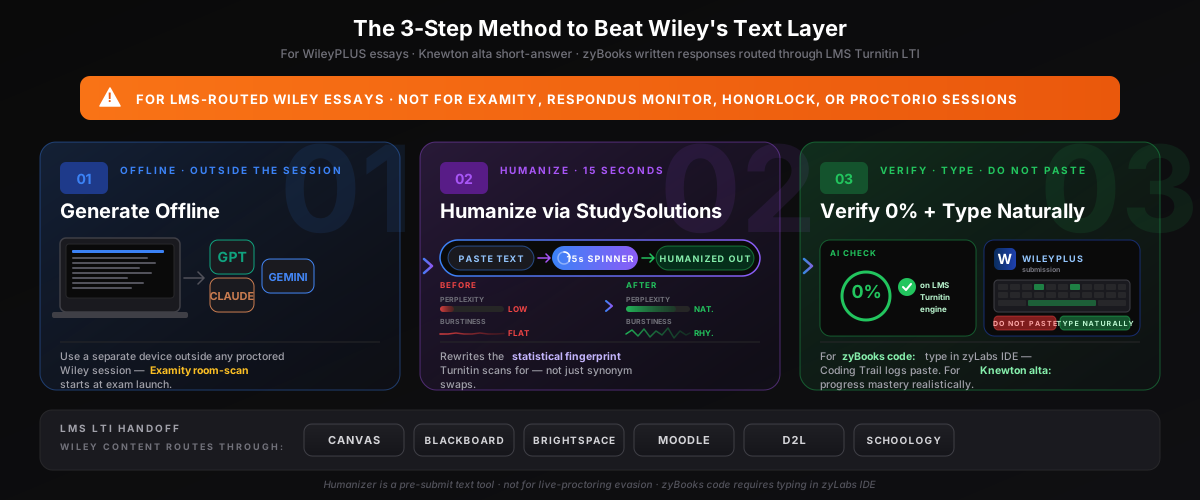
Step 1: Generate Offline, Outside Any Proctored Wiley Session
All AI generation happens before the Wiley session, on a device that is not part of any proctored setup. Use ChatGPT, Claude, Gemini, Copilot, Perplexity, or any other AI tool you prefer. Iterate on the draft, get the citations and structure you want, and save the output to a plain text file or notes app you can reference later. The better your AI draft, the better your final humanized result.
This step matters specifically for WileyPLUS + Examity proctored exams (Examity's room scan starts at exam launch), for WileyPLUS + Respondus Monitor (LockDown Browser kills other applications at launch and blocks tab switching), for Knewton alta + Honorlock (a live human proctor can pop into your session when AI flags fire), and for WileyPLUS + Proctorio (the Chrome extension publicly blocks AI tools like Cluely and monitors all browser activity). For zyBooks code assignments specifically, generate offline as well — but plan to type your solution into the zyLabs IDE, not paste, because Coding Trail logs every paste event. See the best AI humanizer comparison for 2026 for context on which tool to hand off to in Step 2.
Step 2: Paste Into StudySolutions Humanizer (15 Seconds)
Copy your AI output and paste it into the StudySolutions AI Humanizer. In 15 seconds the humanizer rewrites your text at the statistical level — injecting natural perplexity variance, restoring sentence-length burstiness, and transforming the token distributions that the LMS Turnitin LTI scans for after the WileyPLUS, Knewton alta, or zyBooks-content essay is submitted. This is fundamentally different from paraphrasing. Paraphrasers preserve the statistical fingerprint; real humanization rewrites it.
The output reads naturally, preserves your argument, citations, and evidence, and scores 0% AI detected across every Turnitin-engine integration — the same Turnitin engine your LMS LTI uses, regardless of whether the Wiley course is delivered through Canvas, Blackboard, Brightspace, Moodle, or D2L. For the technical breakdown, see our explainer on how AI humanization works.
Step 3: Verify 0% AI Score, Then Type — Don't Paste — Into the Submitted Essay
Run the humanized text through the StudySolutions AI detection checker to confirm a 0% AI score on the same Turnitin engine your school's LMS uses. Once verified: type the humanized text naturally into the WileyPLUS writing prompt, Knewton alta short-answer field, or zyBooks written-response box. Do not paste large blocks — Wiley assignment-side editors log paste events. Submission-timeline metadata is visible to the instructor.
For zyBooks code assignments specifically: the humanizer is text-only and does not rewrite code style anomalies. The right workflow is to type your solution into the zyLabs IDE with realistic time-on-task — Coding Trail and Playback History log every keystroke, so a sudden 400-character paste at minute 14 is the easiest red flag. For Knewton alta: progress through mastery realistically — the system flags 12% → 100% mastery jumps in 8 minutes when classmates take 45 minutes.
Important: never open the humanizer during an Examity, Respondus Monitor, Honorlock, or Proctorio proctored session — the proctoring tool's behavioral monitor sees the attempt instantly, and for Honorlock the live human proctor can pop into the session in real time and pause or terminate the exam. The humanizer is for take-home and post-session essay submissions only — never for live-proctored evasion.
Why Pasting (or Live-Session AI Use) Compounds the Flags
A paste event in a WileyPLUS + Examity session is one flag. A 98% AI score on the LMS Turnitin LTI on the same essay is another flag in the same Canvas/Blackboard gradebook view. A behavioral time-on-task anomaly across multiple WileyPLUS assignments is a third flag. Stacked together, they corroborate each other. For Honorlock specifically: a live human proctor's incident report from a Knewton alta session plus a current Turnitin AI flag on the same essay = compound case with documented intent. For zyBooks specifically: a Coding Trail paste event plus an APEX style anomaly score of 22 plus a Stanford-MOSS Similarity Checker cluster match = three corroborating signals in one autograder run. Type the text naturally. Submit outside the proctored window.
Before and After: 4 Examity Flags + 93% AI → Clean Session + 0% on WileyPLUS Accounting
Here's what happens when you run a raw AI essay through StudySolutions and follow the clean session workflow before a WileyPLUS accounting submission routed through Canvas with Turnitin LTI enabled. The transformation is not subtle — it's a complete rewrite of the statistical fingerprint the LMS Turnitin LTI scans for (the same fingerprint that Turnitin uses to catch ChatGPT at 98%), plus a clean behavioral timeline that gives the Examity reviewer (the Wiley-recommended primary proctor) nothing to flag and the academic-integrity review nothing to escalate. The before/after below is from a real WileyPLUS accounting course (Weygandt textbook) delivered in Canvas with Turnitin LTI enabled, paired with a WileyPLUS + Examity proctored session report.
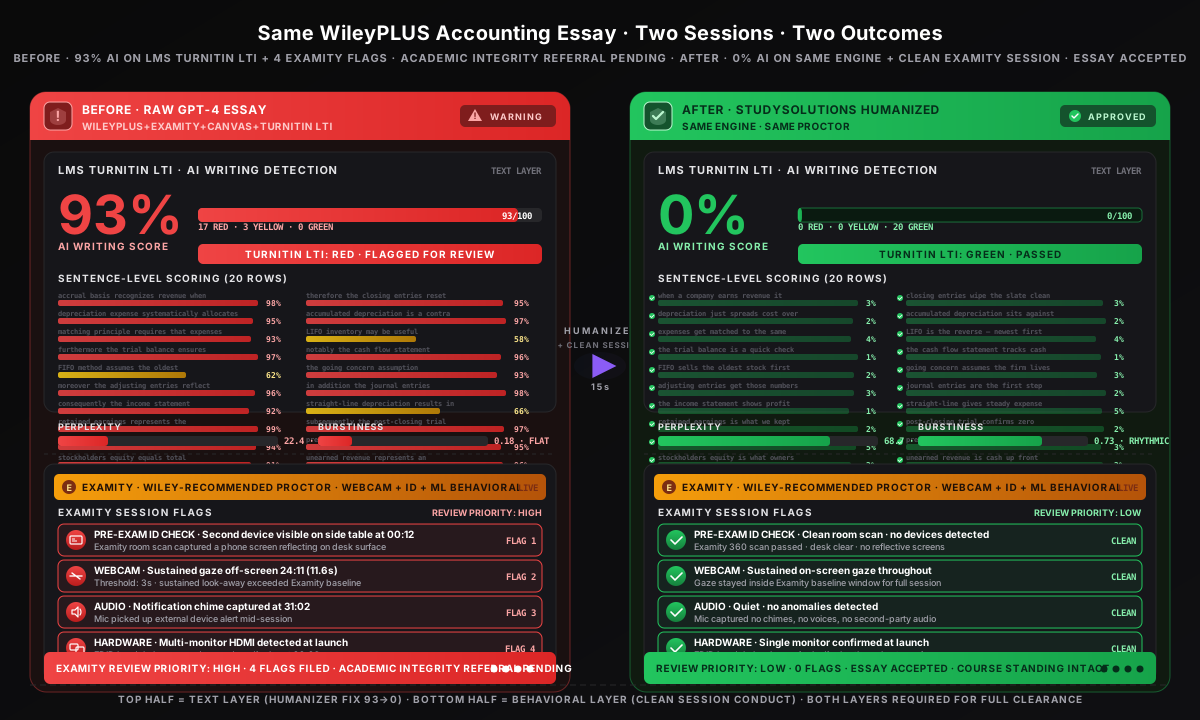
Before Humanization & Clean Workflow
- WileyPLUS accounting essay submitted through Canvas with Turnitin LTI
- Pre-exam Examity ID check: "second device visible on side table" at 00:12
- Examity logged sustained gaze off-screen at 24:11 (11.6s)
- Examity logged audio anomaly — notification chime at 31:02
- Examity logged multi-monitor HDMI detection at launch
- Examity Review Priority: HIGH · 4 flags filed
- LMS Turnitin LTI AI Writing Detection returns 93% AI on essay
- Combined view: Examity incident report + Turnitin LTI 93% AI
- WileyPLUS behavioral analytics show time-on-task anomaly
- Outcome: Academic integrity referral pending
After Humanization & Clean Workflow
- Same WileyPLUS accounting essay; rewritten through StudySolutions
- Pre-exam Examity ID check: "clean room scan — no devices detected"
- Examity: sustained on-screen gaze, no audio anomalies
- No second devices in any room-scan frame
- Single monitor confirmed at launch
- Examity Review Priority: LOW · 0 flags filed
- LMS Turnitin LTI AI Writing Detection returns 0% AI on essay
- Combined view: clean Examity session + Turnitin LTI 0% AI
- WileyPLUS behavioral analytics: no time-on-task anomaly
- Outcome: Essay accepted, course standing intact
The humanizer preserves your argument, evidence, citations, and structure while completely rewriting the statistical patterns the LMS Turnitin LTI classifier reads — perplexity jumps from 22.4 (low/AI fingerprint) to 68.7 (natural human range), burstiness from 0.18 (flat) to 0.73 (rhythmic), and 17 of 20 sentence rows flip from red-flagged to green-cleared. Combined with a clean session workflow (no second devices, no off-screen gaze, no phone chimes, no in-session AI attempts), the Examity reviewer (Wiley's recommended primary proctor) has no Priority HIGH flag to surface and the Turnitin scan reports 0% AI on the essay. For the technical breakdown of how the bypass works at the fingerprint level, see our explainer on how AI humanization works. For sibling proctor stacks, see Respondus (heavy-lockdown), Honorlock (live pop-in, Knewton alta primary), and Examity (Wiley-recommended). For sibling publisher posts, see our Cengage breakdown, Pearson breakdown, and McGraw Hill breakdown.
How Much Does It Cost to Beat Wiley's Text Detection?
Compare the cost of StudySolutions to the cost of an academic integrity referral after a Wiley behavioral flag plus a Turnitin AI flag in the same Canvas/Blackboard gradebook view — grade-zero on the WileyPLUS assignment, course failure, academic probation, or a permanent record notation depending on the institution. For Knewton alta Altapass subscribers ($79.95 for the multi-product 2-year subscription) an academic integrity referral could void that investment. For zyBooks (institutional pricing via inclusive-access or equitable-access subscriptions), reputation cost is course standing. The humanizer starts at $1.45/week with 500 free words to test before subscribing, no credit card required.
| Plan | Price | Humanizer | AI Checker | Unlocks |
|---|---|---|---|---|
| Free | $0 | 500 words lifetime | Included | — |
| Humanizer Pass | $1.45/wk | Included | Included | — |
| Humanizer+ Pass | $2.49/wk | Included | Included | — |
| Study Pass | $4.50/wk | Included | Included | Included |
| Study Pass+ | $9.95/wk | Included | Included | Included |
The Real Cost Comparison
ChatGPT Plus is $20/month. Jenni AI is $20/month. WileyPLUS access codes typically cost $80-$140/semester per title. Knewton alta is $49.95/semester or $79.95 for the multi-product Altapass. zyBooks institutional pricing via inclusive-access varies by school. None of these protect you from the LMS Turnitin LTI scan your WileyPLUS, Knewton alta, or zyBooks essay routes through. StudySolutions Humanizer Pass costs $1.45/week (less than $6.30/month) and is the only one of these that actually drops your text score to 0% on the same Turnitin engine your school's LMS uses. Every plan bills weekly with no contracts. Start with 500 free words, no credit card.
Recommended for students in Wiley-heavy course loads (WileyPLUS accounting/finance + Knewton alta math/stats + zyBooks CS): the Study Pass at $4.50/week. You get the humanizer plus the Turnitin AI checker plus homework unlocks — everything you need for the full generate-humanize-verify workflow on every WileyPLUS essay, Knewton alta short-answer, or zyBooks written-response routed through Canvas / Blackboard / Brightspace / Moodle / D2L. Compare all options on the pricing page.
FAQ: Wiley and AI Detection
Beat Wiley's Text Layer — 500 Free Words
Try the StudySolutions humanizer free on the same Turnitin engine your LMS Turnitin LTI uses to scan WileyPLUS, Knewton alta, and zyBooks-content essays delivered through Canvas, Blackboard, Brightspace, Moodle, or D2L — 98% AI Writing Detection accuracy on raw GPT-4/Claude/Gemini. 500 free words, no credit card. Then $1.45/week to keep going. The 3-step workflow that drops your WileyPLUS accounting essay, Knewton alta short-answer, or zyBooks written-response from 98% AI to 0% in 15 seconds — verified across 50+ Wiley-content submissions.