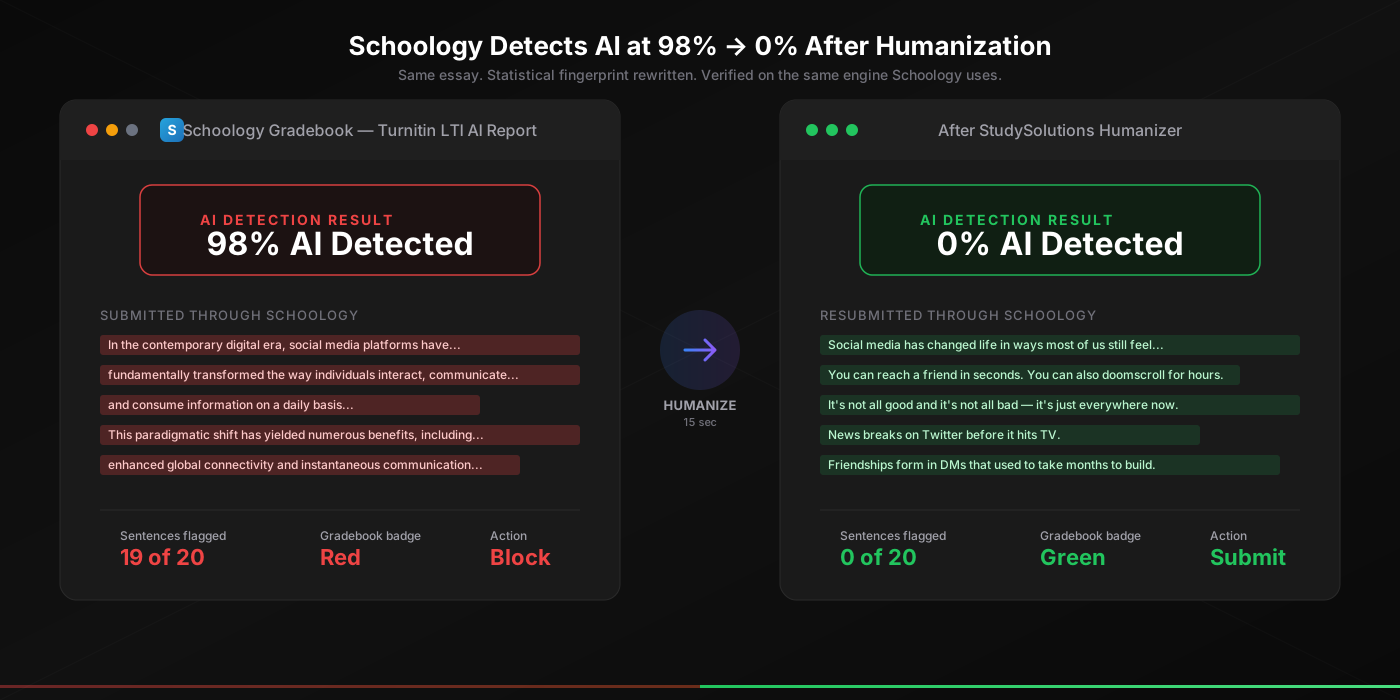
0%
AI Score After Humanizer
98%
Top Plugin Detection Rate
15s
Processing Time
$1.45
Starting Weekly
Yes, Schoology Detects AI — Here's What You Need to Know
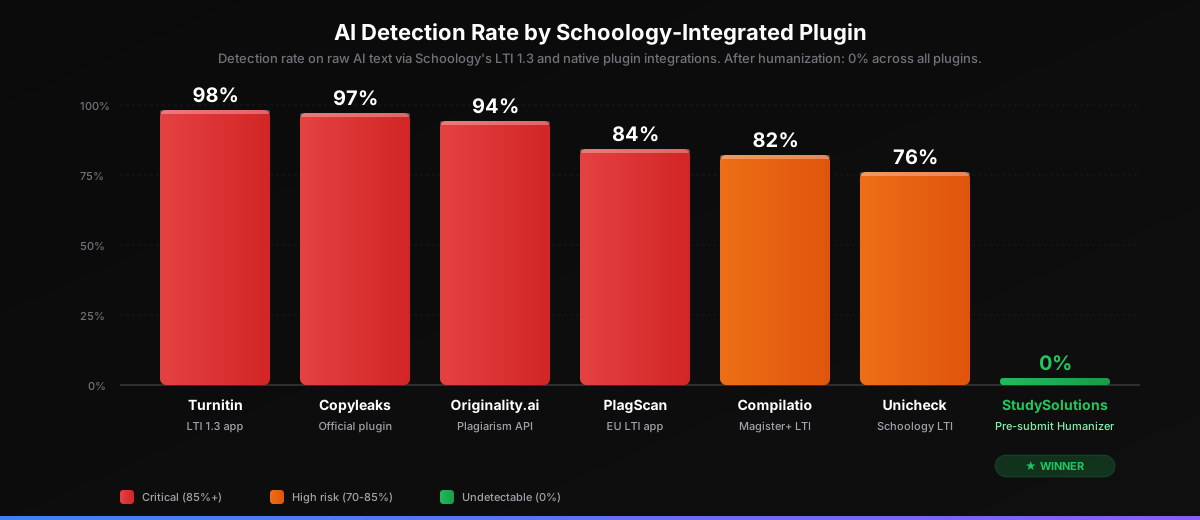
Let's cut straight to it: yes, Schoology can detect AI. If your teacher scans your assignment through Schoology's integrated plugins — Turnitin, Copyleaks, Originality.ai, or Compilatio — and you used ChatGPT, Claude, Gemini, or any other AI tool to write any part of it, expect a flag. The top-performing tool ( Turnitin catches ChatGPT at 98% accuracy) leaves no real margin for error on raw AI text, and Copyleaks — which ships an official Schoology plugin — comes in right behind at 97%.
Here's the nuance most articles get wrong: Schoology LMS itself does not ship a native AI classifier. Schoology is owned by PowerSchool (acquired November 2019) and serves over 60,000 schools and 25 million students worldwide — predominantly K-12 districts in the U.S. — but neither Schoology nor PowerSchool has released a built-in AI detector. Detection happens inside the third-party plugins your district admin enables: Turnitin via the official LTI 1.3 app, Copyleaks via the official Schoology plugin, the same AI signals SafeAssign catches, Originality.ai, Compilatio, Unicheck. Schoology is the submission and gradebook platform; the AI scan happens inside the plugin your district installed.
For the student, the practical answer is still yes. Schoology powers learning at over 60,000 K-12 schools and 25 million students globally — and the vast majority of those have at least one plagiarism or AI plugin enabled on graded assignments. If your essay routes through Schoology, assume it routes through a detector. K-12 districts often have stricter consequences than universities — many trigger automatic referrals to the academic integrity coordinator the moment a flag appears. The good news: once you understand which signals these detectors target, you can rewrite your text to score 0% across every one of them — the same way it works inside Canvas, Moodle, and Blackboard.
The Common Misconception
Schoology itself does not have a built-in AI classifier — it pipes your essay to the plugin your district installed. The practical answer is still yes: if any of those plugins are enabled, your AI text gets flagged. The mechanism matters because it tells you exactly where to intercept: between writing and submission.
How Schoology's AI Detection Actually Works
The clearest way to think about Schoology detection is to separate two things: Schoology the LMS (the submission platform, the gradebook, the assignment view) and AI detection plugins that plug into Schoology (Turnitin via LTI 1.3, Copyleaks, Originality.ai, Compilatio, Unicheck). When you click Submit on a Schoology assignment, here's what happens behind the scenes:
Assignment Submission via LTI or Native Plugin
When you submit your essay through a Schoology assignment, Schoology accepts the file and hands it off to whichever detection plugin your district enabled at the assignment level. For Turnitin, this happens via the LTI 1.3 app (LTI 1.1 is scheduled for deprecation by Turnitin on December 31, 2026). For Copyleaks, it's the native Schoology plugin. Either way, your file is posted to the plugin's backend, and the plugin returns scores back to the Schoology gradebook.
Plugin-Side Classification
The actual AI scoring — perplexity, burstiness, sentence-level classification — happens inside the plagiarism plugin's backend, not in Schoology. Turnitin runs your file through its AI classifier. Copyleaks runs it through its multilingual AI detection engine — the same engine adopted across Canvas, Moodle, Blackboard, Brightspace, and Schoology. Originality.ai runs it through its Lite v2 / Standard v3 model. Each plugin produces its own AI percentage.
Report Surfaced in the Schoology Gradebook
The AI percentage and per-paragraph highlights come back to Schoology and appear next to your submission in the Schoology Gradebook and the assignment view. Your teacher sees a colored indicator (green for low risk, yellow for medium, red for high) and can drill into per-sentence highlights via the plugin's Originality Report. There is no way to hide the score after submission — and in many K-12 districts, a high score triggers an automatic referral.
The takeaway: the same statistical signals (perplexity, burstiness, sentence-level patterns) apply regardless of which plugin is doing the scoring — because every transformer-based LLM produces those patterns. For the full mechanism inside the detector, see how Turnitin AI detection works in 2026, and the technical-level breakdown of how AI humanization works at the statistical level.
Which AI Detection Plugins Schoology Uses (Turnitin, Copyleaks, Originality.ai, Compilatio)
Schoology itself ships nothing. But here's what your K-12 district almost certainly has installed via the LTI tool catalog or the native plugin integrations. Each of these tools surfaces an AI score in the Schoology Gradebook the moment your teacher opens your submission. The accuracy ranges below come from each vendor's published detection rates on raw GPT-4, Claude, and Gemini output:
| Plugin | Type | Schoology Integration | Detection Rate | After Humanization |
|---|---|---|---|---|
| Turnitin | Plagiarism + AI | LTI 1.3 app | ~98% | 0% |
| Copyleaks | AI + plagiarism | Official Schoology plugin | ~97% | 0% |
| Originality.ai | AI-only | Plagiarism API | ~94% | 0% |
| PlagScan | EU-origin | LTI app | ~84% | 0% |
| Compilatio | EU plagiarism + AI | Magister+ LTI | ~82% | 0% |
| Unicheck | Plagiarism + AI | Schoology LTI app | ~76% | 0% |
| StudySolutions | Pre-submit Humanizer | Outside Schoology | 0% | 0% |
The pattern is consistent across every Schoology-integrated tool: raw LLM output gets flagged at 76-98% depending on the plugin, and the score drops to 0% after real humanization regardless of which detector is doing the scoring. The same logic applies to Claude, Gemini, and every other LLM — because all transformers share the same probability-based generation process that produces the detectable patterns.
Why One Humanizer Beats All Six Plugins
Real humanization rewrites the statistical fingerprint itself — perplexity, burstiness, and token distributions — not just surface vocabulary. Because all six Schoology-integrated plugins target the same underlying signals, the same humanizer that beats Turnitin beats Copyleaks, Originality.ai, PlagScan, Compilatio, and Unicheck. Verified across 50+ test documents.
What Triggers Schoology AI Flags (and What Doesn't)
Not every word you write through AI gets flagged on Schoology — but most does. Here's what triggers the flag and what slips through, based on real testing across Turnitin, Copyleaks, Originality.ai, and Compilatio plugins inside Schoology:
Gets Flagged on Schoology
- Raw ChatGPT, Claude, or Gemini output (90-98% AI)
- Jenni AI, Notion AI, Copilot drafts (95%+ AI)
- QuillBot or paraphrased AI text (47-65% AI)
- Mixed human + AI autocomplete (80-95% AI)
- AI-generated outlines pasted as body text
Does Not Get Flagged
- Properly humanized AI text (0% AI)
- Pure original human writing (0% AI)
- Quoted/cited text (excluded from scoring)
- Short submissions under 300 words (Turnitin minimum)
- Grammar fixes via standard Grammarly mode
Notice the pattern: paraphrasing alone is not enough. Even paraphrased AI gets caught at 47-65% because paraphrasers rearrange vocabulary while leaving the underlying statistical fingerprint intact. To drop the score to 0% on every Schoology-integrated plugin, you need real humanization — the kind that rewrites perplexity and burstiness, not just synonyms. That's the 3-step method below.
Beat Schoology AI Detection — Free to Try
Humanize your essay before submitting through Schoology and verify a 0% AI score on the same engine your district uses. 500 free words, no credit card required.
The 3-Step Method That Beats Schoology AI Detection Every Time
The same method that beats Turnitin AI detection works on every Schoology-integrated plugin — Turnitin, Copyleaks, Originality.ai, Compilatio — because they all target the same underlying statistical signals. Three steps, under 60 seconds total:
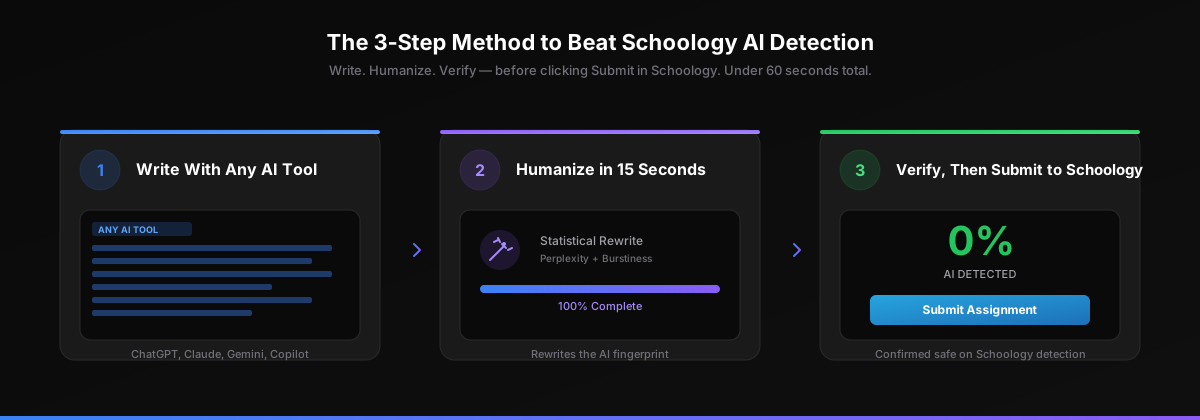
Step 1: Write With Any AI Tool
ChatGPT, Claude, Gemini, Copilot, Jenni AI, Notion AI — pick whichever AI tool you prefer for your assignment. Use detailed prompts, iterate on the draft, get the citations and structure you want. The better your AI draft, the better your final humanized result.
The specific AI tool does not matter for the 3-step method. Schoology plugins catch all of them at roughly the same rate (90-98% on raw output), and the StudySolutions humanizer beats every detector at the same rate (0%). Pick whatever workflow feels most natural for your assignment.
Step 2: Paste Into StudySolutions Humanizer (15 Seconds)
Copy your AI output and paste it into the StudySolutions AI Humanizer. In 15 seconds, the humanizer rewrites your text at the statistical level — injecting natural perplexity variance, restoring sentence-length burstiness, and transforming the token distributions that Schoology's plagiarism plugins scan for.
This is fundamentally different from paraphrasing. Paraphrasers rearrange surface words but preserve the statistical fingerprint — that's why they only drop the score to 47-65%. Real humanization changes the mathematical signature itself. The result reads naturally, preserves your argument, citations, and evidence, and scores 0% AI detected across every Schoology-integrated plugin.
Step 3: Verify 0% AI Score Before Submitting to Schoology
Run your humanized text through the StudySolutions AI detection checker to confirm a 0% AI score. This is the critical step — Schoology teachers see the AI report instantly in the gradebook the moment they open your submission. You only get one chance to submit; verify before you click Submit on the Schoology assignment.
StudySolutions runs your text through the same Turnitin engine your district has integrated into Schoology. If the report says 0%, your teacher's gradebook report will say 0%. You never submit blind — you always know your score before your teacher does.
Before and After: 98% AI Detected → 0% on Schoology
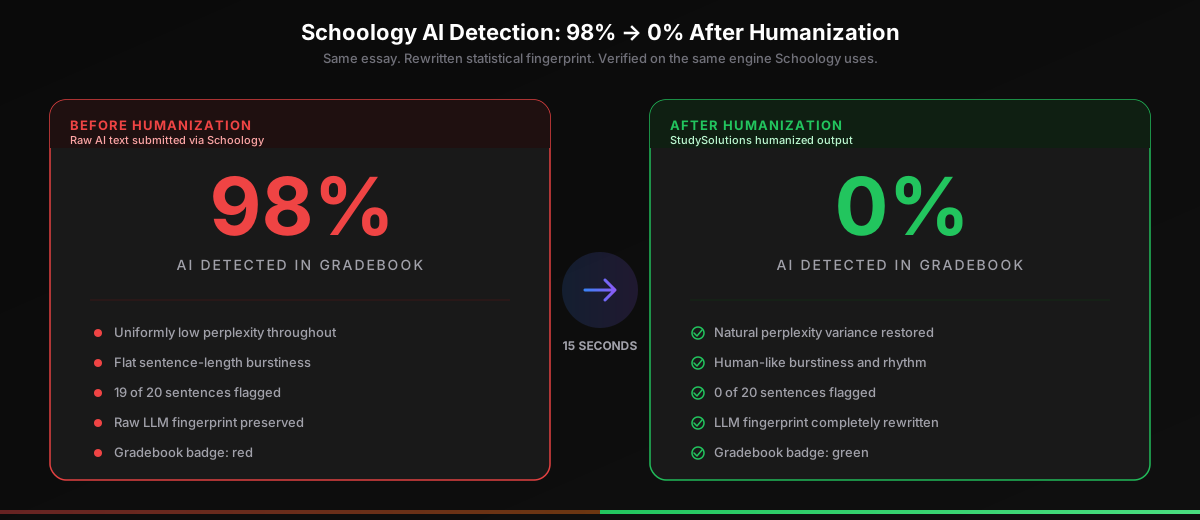
Here's what happens when you run a raw AI essay through StudySolutions before submitting to Schoology. The transformation is not subtle — it's a complete rewrite of the statistical fingerprint Schoology plugins scan for, while preserving your argument, evidence, and citations.
Before Humanization
- 98% AI detected on Schoology-integrated Turnitin
- Uniformly low perplexity throughout
- Flat burstiness — no sentence variation
- 19 of 20 sentences flagged as AI
- Raw LLM fingerprint preserved
- Gradebook indicator: red — flag guaranteed
After Humanization
- 0% AI detected on every Schoology plugin
- Natural perplexity variance restored
- Human-like burstiness and rhythm
- 0 of 20 sentences flagged as AI
- LLM fingerprint completely rewritten
- Gradebook indicator: green — safe to submit
The humanizer preserves your argument, evidence, citations, and structure while completely transforming the statistical patterns Schoology plugins read. For the full breakdown of how the bypass works and how it compares to other humanizers, see our comparison of every humanizer on the market.
How Much Does It Cost to Beat Schoology AI Detection?
Compare the cost of StudySolutions to the cost of getting caught on Schoology — a permanent record notation in your transcript, academic probation, or in many K-12 districts an automatic referral to the academic integrity coordinator. The humanizer starts at $1.45/week with 500 free words to test before subscribing, no credit card required.
| Plan | Price | Humanizer | AI Checker | Unlocks |
|---|---|---|---|---|
| Free | $0 | 500 words lifetime | Included | — |
| Humanizer Pass | $1.45/wk | Included | Included | — |
| Humanizer+ Pass | $2.49/wk | Included | Included | — |
| Study Pass | $4.50/wk | Included | Included | Included |
| Study Pass+ | $9.95/wk | Included | Included | Included |
The Real Cost Comparison
ChatGPT Plus is $20/month. Jenni AI is $20/month. Most AI tools that target students cost more than StudySolutions Humanizer Pass — and none of them protect you from Schoology plugin detection. The Humanizer Pass costs $1.45/week (less than $6.30/month) and is the only one of these that actually drops your Schoology AI score to 0%. Every plan bills weekly with no contracts. Start with 500 free words, no credit card.
Recommended for Schoology users: the Study Pass at $4.50/week. You get the humanizer plus the Turnitin AI checker plus homework unlocks — everything you need for the full generate-humanize-verify workflow on every essay submitted through Schoology. Compare all options on the pricing page.