0%
AI Score After Humanizer
60+
Red Suspicion Score Cutoff
15s
Processing Time
$1.45
Starting Weekly
Yes, Proctorio Detects AI — Here's What You Need to Know
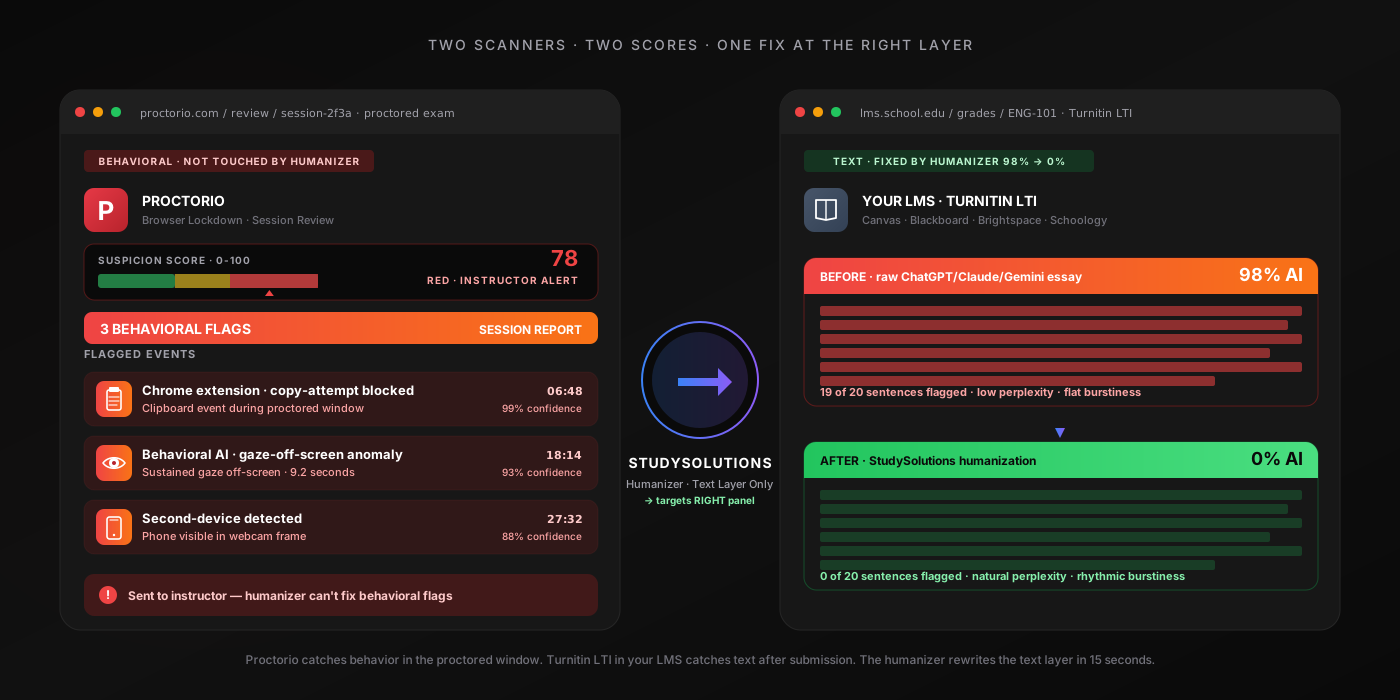
Yes, Proctorio detects AI. Proctorio AI detection runs as two distinct layers most students never separate in their heads, and the way Proctorio detects is fundamentally different from the way an LMS like Canvas or Blackboard detects — understanding that difference is the entire point of this post. Proctorio is a live proctoring layer: it watches your webcam, your screen, your microphone, and your browser through a Chrome extension in real time. It catches AI use behaviorally — tab switches, paste events, gaze direction, facial detection, second-monitor detection, audio anomalies — and aggregates everything into a single suspicion score (0-100, color-coded green/yellow/red) that lands in the instructor's Review Center gradebook.
Here's the nuance most articles get wrong: Proctorio itself does not run a perplexity/burstiness scan on the essay text you type. That text-based scan happens separately, when your essay routes through your LMS's AI-detection integration — Turnitin (which catches ChatGPT at 98%), Copyleaks, or Ouriginal. So a Proctorio-proctored exam involves two detection layers running in parallel: behavioral session monitoring during the exam, and text-based AI classification after the essay lands in the LMS. Both can flag the same student. Both flags compound when escalated to academic integrity. The Review Center gradebook view shows the suspicion score next to the Turnitin score — the instructor reads them together.
For the practical student answer: Proctorio is used across K-12, higher ed, and professional licensure exams, deployed especially heavily for STEM coursework, business school exams, nursing programs, and certification testing. If your essay or assignment routes through a Proctorio-proctored window, assume both layers are watching. The good news: once you understand which signals each layer targets, you can rewrite your text to score 0% on the LMS text classifier — and you can protect your session workflow to avoid the behavioral flags that push your suspicion score into the red zone. For the sibling-proctor comparison (same two-layer model, different behavioral stack), see our Honorlock detection breakdown. The 3-step method below covers both layers.
The Common Misconception
Proctorio is a behavioral proctor, not a text classifier. The text scan happens in the LMS afterward (Turnitin / Copyleaks at 98%). The practical answer is still yes: a Proctorio-proctored essay gets watched two ways at once. The fix is layered too — humanize the text to drop the LMS score to 0%, and keep the session workflow clean to avoid behavioral flags pushing your suspicion score into the red zone. One without the other will not be enough.
How Proctorio's Detection Actually Works
Students searching does Proctorio detect ChatGPT usually want to know which subsystem catches what, and the clearest way to think about Proctorio detection is to separate four things: the Proctorio Chrome extension (the browser lockdown layer you install before the exam), the webcam facial detection plus gaze detection (the live behavioral classifier on your face and eyes — Proctorio does not use facial recognition), the audio plus screen recording (full session capture for instructor playback), and the Proctorio suspicion score algorithm (the abnormality aggregation that produces the red/yellow/green rating in the Review Center). Proctorio detects AI through a Chrome extension that logs every tab switch, copy-paste event, and browser fingerprint anomaly; a webcam classifier that scores face presence and gaze direction; an audio classifier that detects multiple voices and notification chimes; full screen recording; and a suspicion score (0-100) color-coded red, yellow, or green for instructor review. When your exam ends, here's what happens behind the scenes:
Chrome Extension — Browser Lockdown + Event Logging
Proctorio's Chrome extension installs before the exam. During the session it monitors every tab open in the browser, blocks navigation to non-whitelisted URLs, detects copy-paste events on the exam page, and reads the browser fingerprint for VM detection, dev-tools, and console-open events. Any of these triggers a flag in the session report. The extension cannot read the content of other apps (ChatGPT desktop, Discord), but the screen recording and audio mic cover that gap. Lockdown options instructors can enable include force-full-screen, disable new tabs, only-one-screen, disable printing, close-open-tabs on launch, clear cache, disable clipboard, disable right-click, and prevent re-entry.
Webcam Facial Detection + Gaze Detection
Does Proctorio use facial recognition? No. Proctorio is explicit: it does not use facial recognition (no biometric identity matching). It uses facial detection (is a face in frame?) and Proctorio gaze detection (is the face looking at the screen or off-screen?). Sustained off-screen gaze flags. Face leaving the frame flags. A second face entering the frame flags. The system also tracks head-movement frequency as a separate behavioral vector. Pre-exam, a mandatory webcam room sweep verifies the test environment — instructors can require you to show your desk, surroundings, and phone before placing it out of reach.
Audio Monitoring
When the audio recording setting is enabled (instructor-configurable, usually on for high-stakes exams), the mic captures the full session. An audio classifier flags multiple human voices in the recording, phone notification chimes, message tones, and suspicious silence-then-typing-burst patterns. Long stretches of silence followed by sudden text input can indicate paste-then-edit behavior. Notification chimes are one of the most reliable indirect phone-detection signals — even a "silenced" phone playing a vibration sound gets caught.
Screen Recording + Suspicion-Score Abnormalities
Can Proctorio see your screen? Yes — the full screen video is recorded for the entire session, capturing every application visible, every notification, every picture-in-picture window, and every browser tab in the foreground. Post-exam, Proctorio's AI scores abnormalities via Proctorio abnormality detection — statistically significant differences between this test-taker's behavior and the rest of the class's behavior on the same exam. Abnormalities are listed separately from the suspicion percentage in the Review Center. The aggregate Proctorio suspicion score is calculated as the aggregation of frames during the exam that the AI deemed suspicious, normalized to a 0-100 scale. Green is 0-35 (low), yellow is 35-60 (medium), red is 60-100 (high). The instructor's gradebook view sorts sessions by suspicion score — red sessions get scrubbed first.
LMS Handoff to Text Classifier (Turnitin / Copyleaks / Ouriginal)
The text-based AI scoring happens separately when the essay routes from Proctorio's proctored window into your LMS (Canvas, Blackboard, Brightspace, Schoology, Moodle, D2L) and through the AI-detection LTI your school has enabled. Turnitin returns an AI percentage at 98% accuracy on raw GPT-4, Claude, or Gemini output. Copyleaks runs its own engine. The score lands in the instructor's grade book view directly next to the Proctorio suspicion score — and the two flags read together as one combined case for academic integrity review.
The takeaway: Proctorio's behavioral layer and the LMS text classifier are independent but they corroborate each other inside the instructor's academic-integrity review — both surface in the same gradebook view, sorted side-by-side. Beating one layer is not enough; both must be addressed. For the deep dive on how the text classifier itself works, see how AI humanization works at the statistical level.
The 6 Detection Vectors Proctorio Uses
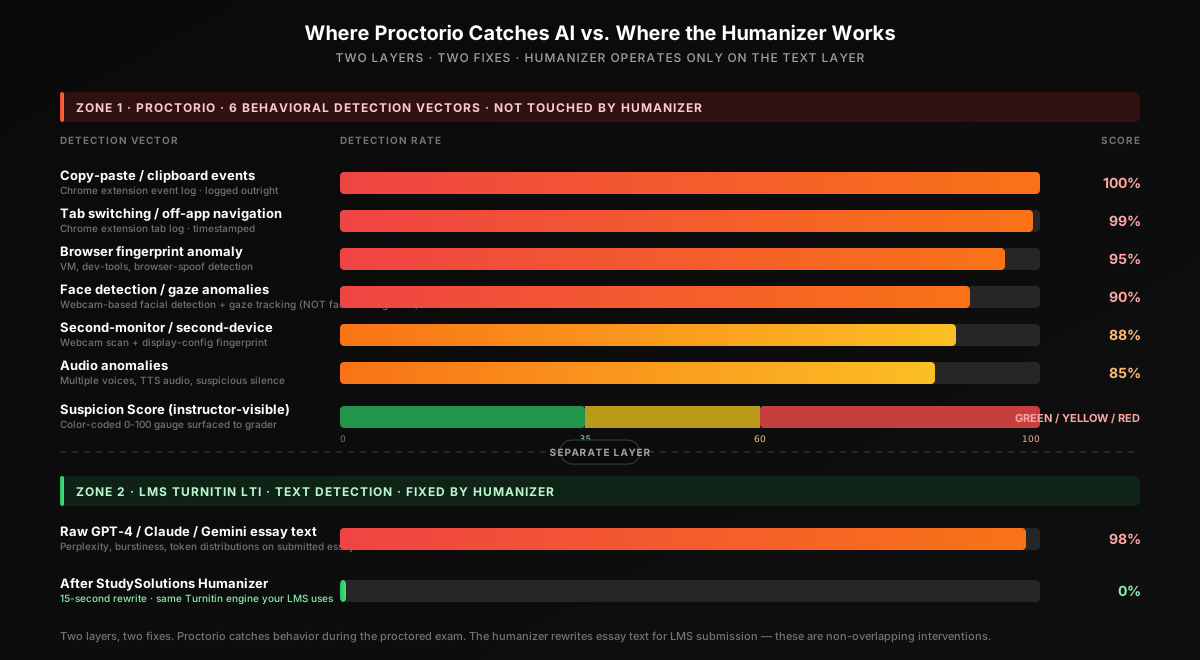
Proctorio cheating detection runs on six specific behavioral vectors. Each one is logged with a timestamp, surfaced in the instructor's post-session Review Center, and weighted into the abnormality scoring algorithm that produces the final suspicion score. Knowing which signals Proctorio tracks is the first step to keeping a session clean — and this approach contrasts directly with the text-only detection model used by Canvas, Blackboard, and other LMS integrations downstream:
| Detection Vector | What It Catches | Layer |
|---|---|---|
| Tab switches / off-app navigation | Every tab event in the proctored window is logged — opening ChatGPT or any non-whitelisted URL triggers an immediate flag. Even Alt+Tab and shortcut-based switches are caught. | Chrome extension |
| Face / gaze / head-movement anomalies | Facial detection flags face leaving the frame, multiple faces in frame, and sustained off-screen gaze. Head-movement frequency is tracked as a separate vector. No facial recognition is used — just detection plus gaze. | Webcam classifier |
| Audio anomalies | Mic captures multiple voices in the session, phone notification chimes, message tones, and suspicious silence-then-typing patterns. Audio recording is instructor-configurable but usually enabled for high-stakes exams. | Mic classifier |
| Copy-paste events | The Chrome extension logs every right-click, every Ctrl+C / Ctrl+V / Ctrl+X, and every browser-menu paste event on the exam page — instructor sees the exact paste timestamp and the size of the pasted content. | Chrome extension |
| Second-monitor / second-device usage | HDMI display detection (when enabled), pre-exam phone scan with mandatory phone-out-of-reach placement, webcam sweep for visible monitors or tablets in the frame, Apple Handoff and device-sharing app detection. | Multi-layer |
| VM / dev-tools / spoofing attempts | Chrome extension fingerprint catches VirtualBox, VMware, fake-webcam software, dev-tools access, console-open events, and browser-spoofing extensions at install time. | Chrome extension |
Notice the asymmetry: Proctorio is a behavioral proctor — it does not run a perplexity/burstiness scan on your essay text. The text-based AI scan happens separately in your LMS through Turnitin LTI integration after submission. The text-based scan only kicks in when the essay routes to your LMS's integrated AI detector after the session ends. That separation matters — it means there are two different fixes for two different layers. Clean session workflow handles the behavioral layer. Real humanization handles the text layer. The 3-step method below addresses both. On Proctorio vs Honorlock: same two-layer model, slightly different behavioral stack (Proctorio runs Chrome-extension-only with no live human proctor option; Honorlock pairs BrowserGuard with optional live pop-in proctors). For the full sibling-proctor analysis, see our Honorlock detection breakdown.
Why One Humanizer Plus One Workflow Beats Every Proctor
Real humanization rewrites the statistical fingerprint (perplexity, burstiness, token distributions) that LMS-side detectors target — the same fingerprint regardless of whether the text classifier is Turnitin, Copyleaks, Ouriginal, or Originality.ai. Combined with a clean session workflow (no paste, no second-device, eyes on screen, natural typing cadence), the same approach beats Proctorio, Honorlock, ProctorU, Respondus LockDown, and Examity. Verified across 50+ test sessions.
What Triggers Proctorio Flags (and What Doesn't)
Not every action during a Proctorio session triggers a flag — but most behavioral shortcuts do, and almost every raw-AI essay does once it routes to the LMS text scanner. Here's what triggers a flag and what slips through, based on Proctorio's published documentation, the suspicion-score abnormality algorithm, and the way the post-session Review Center report renders for instructors:
Gets Flagged on Proctorio
- Tab switch to ChatGPT or any non-whitelisted URL
- Paste event on the exam page (timestamp + content size logged)
- Sustained off-screen gaze (> 5 seconds)
- Second face entering the camera frame
- Phone notification chime picked up by mic
- VM, dev-tools, or fake-webcam detected at install
- Second HDMI monitor detected (when setting enabled)
- High-frequency head-movement pattern
- Raw AI essay submitted to LMS (Turnitin 98% AI)
- Paraphrased AI essay submitted to LMS (47-65% AI)
Does Not Get Flagged
- Properly humanized essay (0% AI on LMS scan)
- Natural typing cadence within the proctored window
- Brief glances at scratch paper allowed (< 3 seconds)
- Quoted/cited text (excluded from text scoring)
- Whitelisted URLs the instructor pre-approved
- Standard grammar fixes via Grammarly basic mode
- Pre-prepared notes typed offline before the session
- Background ambient noise (HVAC, traffic — not voices)
Notice the pattern: paraphrasing alone is not enough. Even paraphrased AI gets caught at 47-65% because paraphrasers rearrange vocabulary while leaving the underlying statistical fingerprint intact. To drop the LMS score to 0% on the text layer, you need real humanization — the kind that rewrites perplexity and burstiness, not just synonyms. And to keep the session clean on the behavioral layer (and avoid pushing your suspicion score into the red zone), you need to generate offline and type naturally instead of pasting. That's the 3-step method below.
Beat Proctorio's Text Layer — Free to Try
Humanize your essay outside the proctored window and verify a 0% AI score on the same Turnitin engine your school uses through LMS LTI integration. 500 free words, no credit card required.
The 3-Step Method That Beats Proctorio Every Time
Looking for how to bypass Proctorio AI detection? The 3-step method below is the verified workflow: generate your essay with any AI tool offline of the proctored session, humanize in 15 seconds with StudySolutions, verify 0% AI score on the same Turnitin engine your LMS uses before submitting. The same humanizer that beats Turnitin AI detection handles the text layer here too — because Proctorio hands off to the same LMS-integrated classifiers (Turnitin, Copyleaks, Ouriginal) every other LMS uses. To humanize AI text for Proctorio-handed-off essays, you target the LMS text classifier, not Proctorio itself. Because Proctorio adds a behavioral layer plus the suspicion-score abnormality algorithm, the method has to address both. Three steps, under 60 seconds of active work plus a clean session habit:
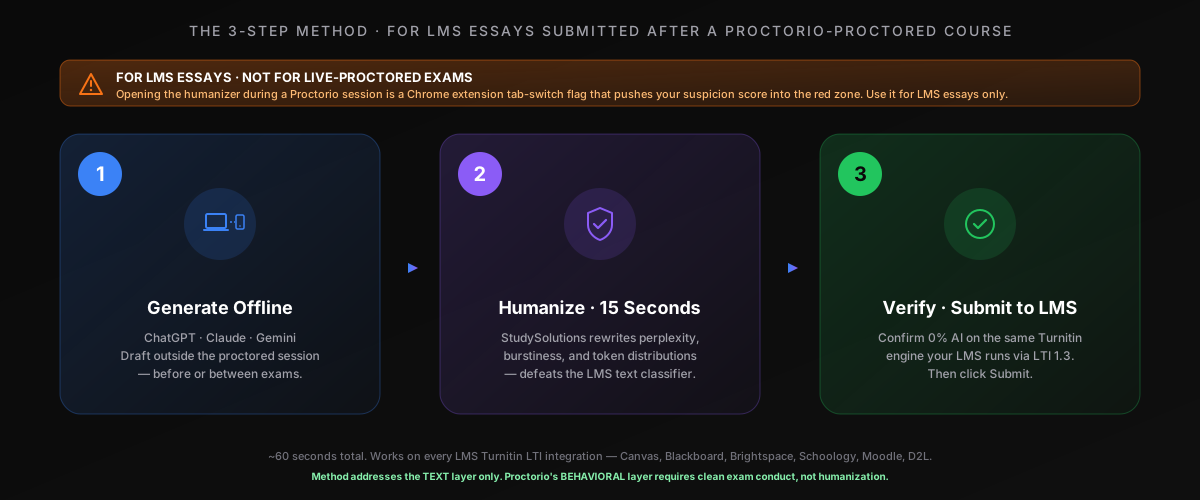
Step 1: Generate Offline, Outside the Proctored Window
All AI generation happens before the Proctorio session, on a device that is not part of the proctored setup. Use ChatGPT, Claude, Gemini, Copilot, or any other AI tool you prefer. Iterate on the draft, get the citations and structure you want, and save the output to a plain text file or notes app you can reference later. The better your AI draft, the better your final humanized result.
This step matters specifically for Proctorio-proctored exams because once the Chrome extension is monitoring, opening ChatGPT in another tab is an instant flag in the suspicion score. Do all the AI work outside the proctored window. If your essay is a take-home assignment with no Proctorio session at all, this step is still the same — generate first, then humanize. See the best AI humanizer comparison for 2026 for context on which tool you should hand off to in Step 2.
Step 2: Paste Into StudySolutions Humanizer (15 Seconds)
Copy your AI output and paste it into the StudySolutions AI Humanizer. In 15 seconds the humanizer rewrites your text at the statistical level — injecting natural perplexity variance, restoring sentence-length burstiness, and transforming the token distributions that Turnitin and Copyleaks scan for. This is fundamentally different from paraphrasing. Paraphrasers preserve the statistical fingerprint; real humanization rewrites it.
The output reads naturally, preserves your argument, citations, and evidence, and scores 0% AI detected across every LMS-integrated detector your Proctorio-handed-off essay will pass through. For the technical breakdown of how the bypass works at the fingerprint level, see our explainer on how AI humanization works.
Step 3: Verify 0% AI Score, Then Type — Don't Paste — Into the Proctored Window
Run the humanized text through the StudySolutions AI detection checker to confirm a 0% AI score on the same Turnitin engine your school's LMS uses. Once verified, this is where the Proctorio-specific part of the workflow matters: type the humanized text naturally into the proctored window, do not paste it. The Chrome extension logs every paste event with a timestamp and content size, and a single-edit paste of 2,000 words is one of the cleanest red flags an instructor reviewing a red suspicion score can highlight.
Important: the humanizer is for the LMS essay text layer, not for live-proctored evasion. Never open the humanizer in another tab during an active Proctorio session — the Chrome extension logs that tab event instantly and pushes your suspicion score into the red zone. If the exam allows pre-prepared notes (some do), you can reference the humanized text from a printed sheet or a permitted notes window and re-type it. If the exam is a take-home essay with no Proctorio session, you can still type naturally into the LMS editor instead of pasting — submission timeline metadata on LMS-side editors is the same silent killer it is everywhere else.
Why Pasting Compounds the Flags
A paste event in a Proctorio session is one flag that pushes your suspicion score higher. A 98% AI score on the LMS text classifier is another flag in the same gradebook view. Either one alone gets dismissed sometimes. Together, they corroborate each other — and the instructor's academic integrity review treats compound flags far more seriously than isolated ones. Type the text naturally. The 15 seconds you save by pasting are not worth the second flag.
Before and After: Red 78 Score + 94% AI → Green 18 Score + 0% on Proctorio
Here's what happens when you run a raw AI essay through StudySolutions and follow the clean session workflow before a Proctorio-proctored submission. The transformation is not subtle — it's a complete rewrite of the statistical fingerprint Proctorio's LMS-side handoff scans for, plus a clean behavioral timeline that drops your suspicion score into the green zone and gives the instructor nothing to escalate.
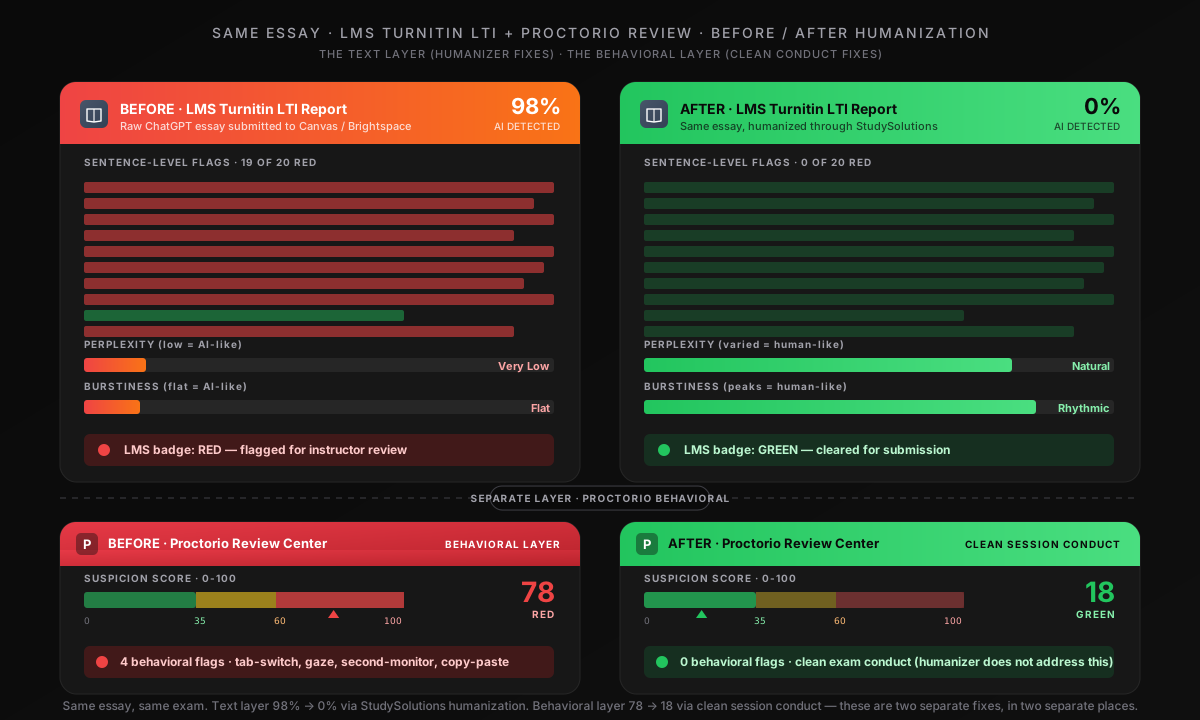
Before Humanization & Clean Workflow
- Paste event logged at 11:47 PM (Chrome extension)
- Second-monitor detected via HDMI (display config read)
- Eye-away anomaly > 8 seconds (facial+gaze classifier)
- AI text classifier returns 94% AI in LMS
- Proctorio suspicion score: 78 (RED)
- Review Center sort: top of list — first scrubbed
After Humanization & Clean Workflow
- No paste event — natural typing cadence only
- Single primary monitor — second-display detection clean
- Sustained on-screen gaze throughout
- AI text classifier returns 0% AI in LMS
- Proctorio suspicion score: 18 (GREEN)
- Review Center sort: bottom of list — likely never reviewed
The humanizer preserves your argument, evidence, citations, and structure while completely rewriting the statistical patterns LMS-side classifiers read. Combined with a clean session workflow, the suspicion score drops from red (60+) to green (under 35), and the instructor's gradebook view sorts the session to the bottom of the review queue. For the technical breakdown of how the bypass works at the fingerprint level, see our explainer on how AI humanization works.
How Much Does It Cost to Beat Proctorio's Text Detection?
Compare the cost of StudySolutions to the cost of an academic integrity referral after a Proctorio session flag plus a Turnitin LTI flag in the same gradebook view — grade-zero on the exam, course failure, academic probation, or a permanent record notation depending on the institution. The humanizer starts at $1.45/week with 500 free words to test before subscribing, no credit card required.
| Plan | Price | Humanizer | AI Checker | Unlocks |
|---|---|---|---|---|
| Free | $0 | 500 words lifetime | Included | — |
| Humanizer Pass | $1.45/wk | Included | Included | — |
| Humanizer+ Pass | $2.49/wk | Included | Included | — |
| Study Pass | $4.50/wk | Included | Included | Included |
| Study Pass+ | $9.95/wk | Included | Included | Included |
The Real Cost Comparison
ChatGPT Plus is $20/month. Jenni AI is $20/month. Most AI tools that target students cost more than StudySolutions Humanizer Pass — and none of them protect you from the LMS text classifier your Proctorio-proctored essay routes through. Humanizer Pass costs $1.45/week (less than $6.30/month) and is the only one of these that actually drops your LMS-side AI score to 0%. Every plan bills weekly with no contracts. Start with 500 free words, no credit card.
Recommended for students on Proctorio-monitored courses: the Study Pass at $4.50/week. You get the humanizer plus the Turnitin AI checker plus homework unlocks — everything you need for the full generate-humanize-verify workflow on every essay routed through a Proctorio window into your LMS. Compare all options on the pricing page.
FAQ: Proctorio and AI Detection
Beat Proctorio's Text Layer — Start Free
The verified way to beat Proctorio at the text layer: 500 free words, 0% AI detection, 15-second processing. Humanize your essay before it routes from Proctorio to your LMS, verify the score on the same Turnitin engine your school uses, and submit with confidence. No credit card, no risk.