5
Free Unlocks
<30s
Per Unlock
11
Platforms Supported
$1.45
Unlimited / Week
What Is a Chegg Unlocker?
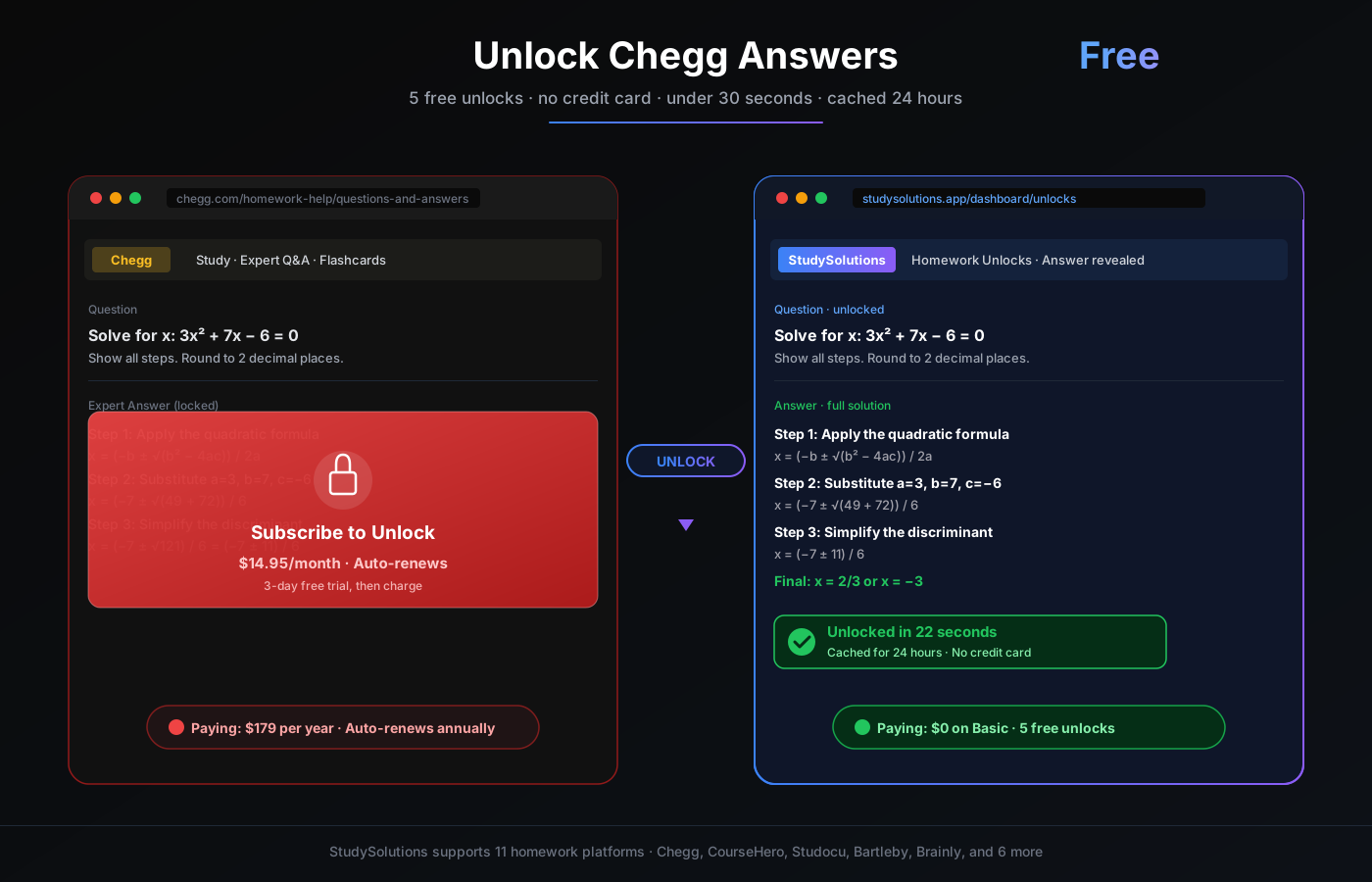
A Chegg unlocker is a tool that lets you view the full expert answer to a Chegg homework question without paying for a Chegg Study subscription. Paste the Chegg question URL, wait under 30 seconds, and read the complete step-by-step solution — no Chegg account, no browser extension, no $14.95/month commitment.
The best Chegg unlocker in 2026 is StudySolutions. It works on its own server-side — retrieving the expert answer through an independent provider network — and delivers the result to your StudySolutions dashboard through a signed 24-hour preview link. You never log in to Chegg. You never install anything. You just paste and view.
Every new StudySolutions account starts with 5 free Chegg unlocks — no credit card required. That is enough to handle a week of homework questions without paying a cent. When you need more, the Homework Pass tier at $1.45/week gives you unlimited unlocks across Chegg, CourseHero, Bartleby, and Studocu — roughly 90% cheaper than Chegg's own subscription.
Why this exists in 2026: Chegg raised prices, added auto-renew traps, and started auto-charging $179/year to students who forgot to cancel their free trial. Students pushed back by searching for "unlock Chegg answers free" — and StudySolutions was built to serve them a clean, legit, server-side path instead of the karma farms and sketchy extensions that dominated 2023–2024.
Why Chegg Locks Answers Behind a Paywall
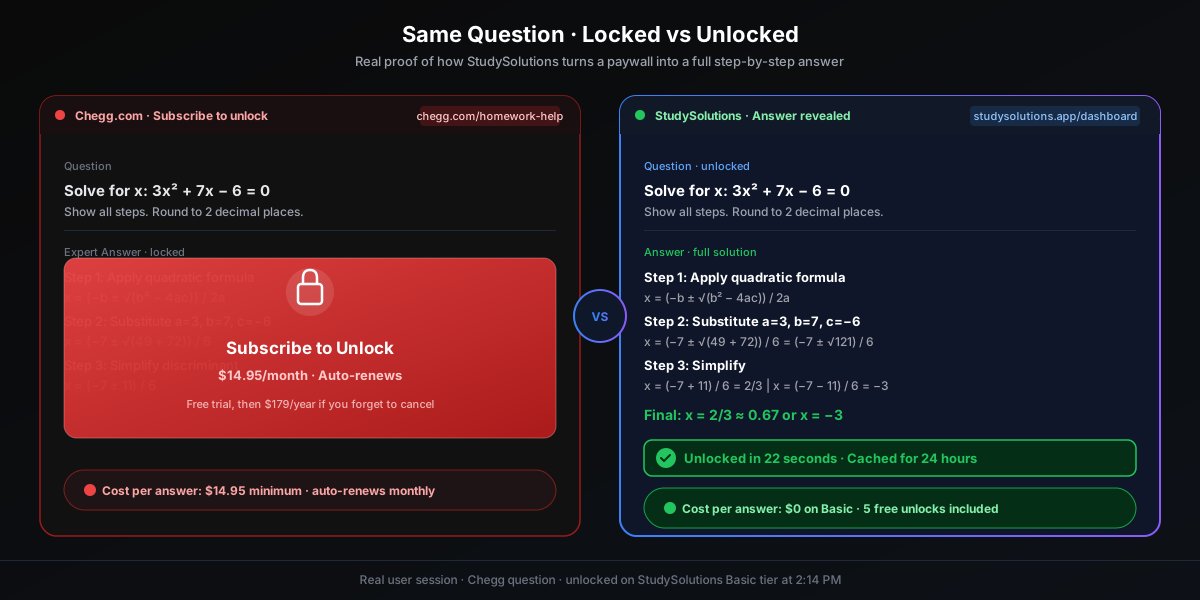
Chegg's entire business model depends on the paywall. They pay contract experts to answer questions — then charge students recurring subscription fees to view those answers. Every time you see "Subscribe to unlock," that is Chegg protecting the pricing funnel their investors care about.
$14.95/month minimum — and it auto-renews
Chegg Study starts at $14.95/month. If you forget to cancel, it quietly renews — and the annual cost hits $179. Students routinely sign up for one answer, forget, and end up paying for months of access they never used.
Free trial → auto-charge trap
Chegg offers a 3-day free trial — but only with your credit card attached. If you do not cancel before the trial ends, you are charged the full monthly rate immediately. This pattern is a deliberate acquisition funnel, not a consumer benefit.
One-off answers cost the same as a full month
If you only need 3 Chegg answers this semester, Chegg still charges you the $14.95 minimum — your cost per answer is $5. Compare that to StudySolutions Basic: the same 3 answers cost you $0 because every new account gets 5 free unlocks.
The net effect: students who only need occasional Chegg access end up subsidizing the heavy-use power users. A Chegg unlocker inverts that math — you only pay for what you actually use, or use the free tier for light weeks.
How a Chegg Unlocker Actually Works
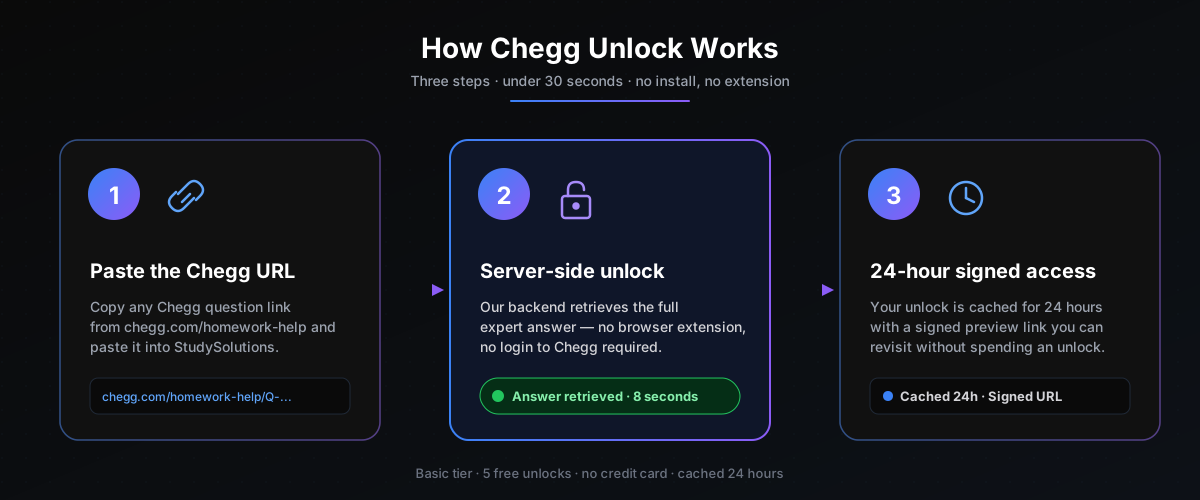
StudySolutions does not hack Chegg, hijack your Chegg cookies, or run anything in your browser. The unlock flow is entirely server-side and can be explained in three lines: paste the URL, wait for the server-side fetch, view the signed preview. Here is what happens at each step.
Step 1 — You paste the Chegg question URL
Copy the URL of any Chegg question (format: chegg.com/homework-help/questions-and-answers/...) and paste it into the StudySolutions unlock dashboard. That is the only thing you do. No Chegg account, no browser extension, no VPN, no Discord server to join.
Step 2 — StudySolutions retrieves the answer server-side
Our backend calls an independent provider that already has access to Chegg's expert answers. The full question, the step-by-step solution, and any diagrams are retrieved and stored against your account. This typically completes in under 30 seconds. Your Chegg account is never touched — in fact, you do not need one.
Step 3 — The unlock is delivered via a 24-hour signed preview
The unlocked answer appears in your unlocks dashboard through a signed preview URL that stays active for 24 hours. Re-open it as many times as you want during that window — cached views do not count against your unlock quota. After 24 hours, the signed URL expires (this is an anti-abuse measure, not a pricing trick).
Step-by-Step Walkthrough: Your First Free Unlock
Here is the full sequence, start to finish. Budget 2 minutes the first time and under 30 seconds every time after.
Create a free StudySolutions account
Sign up at studysolutions.app/auth/signup. Email + password is enough. No credit card, no phone number. Your account comes with 5 free Chegg unlocks immediately.
Copy the Chegg question URL
From any Chegg question page (the one showing the "Subscribe to unlock" wall), copy the full URL from the browser's address bar. It starts with https://www.chegg.com/homework-help/ — the question does not need to be public or shared.
Paste the URL into the dashboard unlock field
Head to your Unlocks dashboard, paste the URL, and click Unlock. The page shows a live progress indicator while the server-side unlock runs.
Wait under 30 seconds
Most unlocks finish in 15 to 25 seconds. Longer questions with many steps or diagrams can take up to 45 seconds. You do not need to keep the tab open — the unlock continues in the background, and the answer shows up in your dashboard when it is done.
View the full answer — cached 24 hours
Open the unlocked result. You get the full question text, the step-by-step expert solution, and any diagrams. The signed preview link stays active for 24 hours, so you can re-open it from anywhere without spending another unlock.
Free vs Paid — Which Tier Should You Pick?
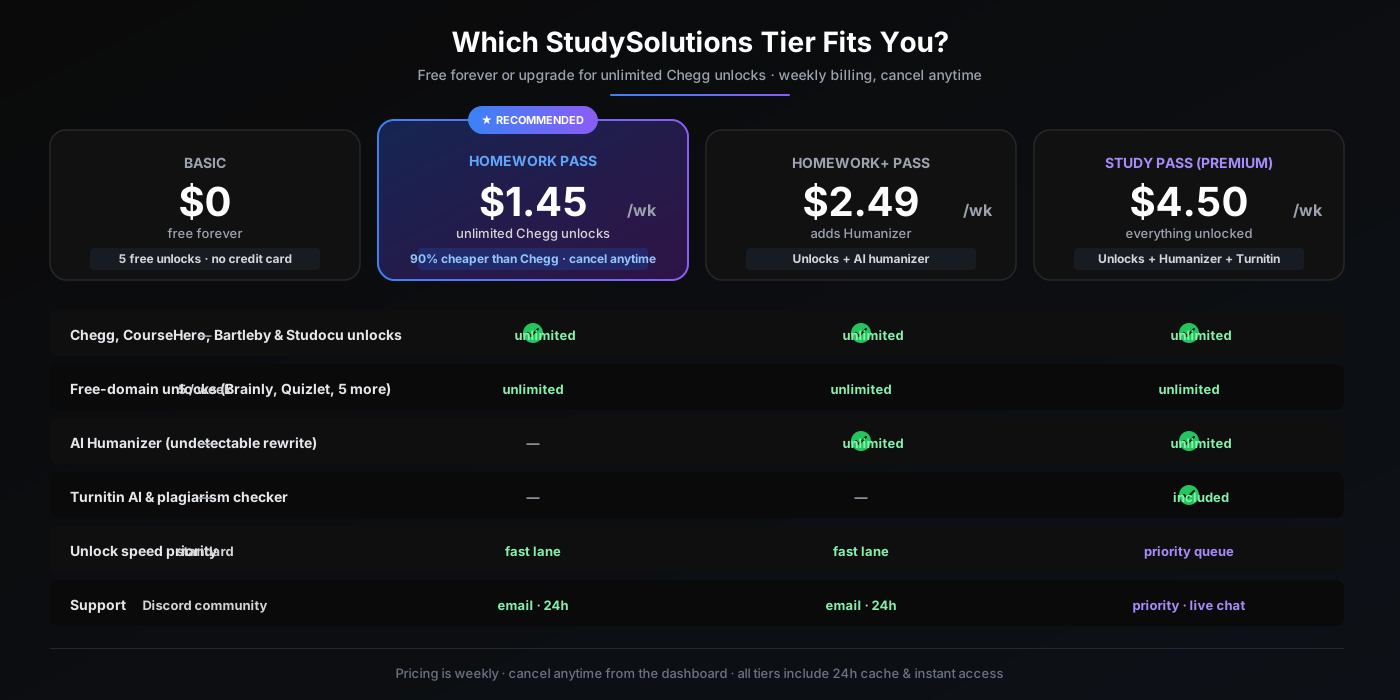
Most students do not need to pay for anything. 5 free Chegg unlocks per account covers a light homework week comfortably. If you need more, StudySolutions pricing is weekly (not monthly like Chegg), so you only pay during the weeks you actually use it. Cancel anytime — no annual lock-in, no auto-renew trap.
Stay on Basic if:
- You need 5 or fewer Chegg answers total
- You want to try StudySolutions before paying
- You mostly use free-domain sites (Brainly, Quizlet, etc.)
- You do not want to put a credit card on file
Upgrade to Homework Pass ($1.45/week) if:
- You need more than 5 Chegg unlocks in a week
- You also use CourseHero, Bartleby, or Studocu
- You want fast-lane unlock speed and email support
- You want to save ~90% vs. Chegg Study
The math is straightforward: a single month of Chegg ($14.95) costs more than 10 weeks of Homework Pass ($14.50). If you are paying Chegg right now, you are overpaying by an order of magnitude.
Alternatives — And Why They Fail
Every student who searches "unlock Chegg answers free" eventually lands on the same four bad options. Here is why each one lets you down, and what to do instead.
Reddit r/CheggAnswers / r/Chegg_Unlocks — slow and unreliable
You post a link and hope a volunteer uploads the answer. Typical wait time is 4 to 48 hours. Half the requests go ignored. Some subs require karma farming before you can even post. There is no guarantee the uploader has a valid Chegg account. Terrible for deadline-driven homework.
Sketchy Chrome extensions — account theft risk
Extensions that claim "free Chegg unlock" typically read all your browser cookies, inject ads, or quietly harvest your Chegg/Google credentials. Half have been pulled by Google for malware. Never install one — the cost-benefit is terrible.
Discord "Chegg dealers" — Venmo-your-stranger scams
Pay $2 to a stranger on Discord via Venmo or CashApp, and maybe they send you the answer 30 minutes later. Or maybe they block you and keep the money. No refunds, no accountability, no support. Dozens of these servers get shut down each semester.
Paying for Chegg outright — $179/year for occasional use
The default path. Works, but charges you $14.95/month even when you only need two answers that month. The auto-renew trap is real. And Chegg does not unlock CourseHero, Bartleby, or Studocu — you would need separate subscriptions to each.
StudySolutions — the only path that actually works
5 free unlocks with no credit card. Under 30 seconds per unlock. 24-hour cache. Server-side, so your Chegg credentials are never touched. Starting at $1.45/week for unlimited — 90% cheaper than Chegg Study. Supports 11 homework platforms in one account. Cancel anytime from the dashboard.
For the full breakdown of every homework platform we support — including CourseHero, Studocu, Bartleby, and the 7 free-domain sites — read our comprehensive homework unlock guide.
Is StudySolutions Safe and Legit?
Short answer: yes — and provably so, because the architecture itself prevents the bad outcomes sketchy unlock tools create. Here are the four safety properties most students ask about, each verifiable.
No Chegg login required
You never enter Chegg credentials into StudySolutions. We cannot access your Chegg account, your Chegg cookies, or your Chegg billing history — because we never ask for them. This eliminates the entire category of "account theft" risk that Chrome extensions carry.
No browser extension
StudySolutions is a web app. Nothing runs in your browser. We cannot read your email, your banking tabs, or your history. Compare that to the typical "Chegg unlock extension," which typically requests permission to read all data on all sites.
Stripe-handled billing · no auto-renew trap
Payments run through Stripe (the same infrastructure Shopify and Notion use). Billing is weekly, cancel-anytime, and visible in your dashboard at all times. There is no 3-day trial that silently charges $179. If you want to cancel, it is one click.
Signed preview URLs · 24-hour expiration
Unlocked answers live behind signed URLs that expire after 24 hours. This protects the expert-answer provider network and also means your unlocks are not discoverable by third parties. If you screenshot or save the answer, that is your copy — not a public link.
Academic integrity: Chegg answers are study aids. Use them the way you would use a textbook solutions manual — to understand the approach, not to copy-paste into your submission. If your class requires AI-free, fully original work, pair your unlock with our humanizer guide and verify your work with a Turnitin-compatible checker before submitting.
Frequently Asked Questions
Pricing & Final CTA
Start with 5 free Chegg unlocks — no credit card, no commitment. Upgrade only if you need more, and cancel any time from the dashboard.
Basic
$0
Free forever · no credit card
- 5 free Chegg unlocks
- 5 free-domain unlocks/week
- 24-hour cache
Homework Pass
$1.45/week
Billed weekly · Cancel anytime
- Unlimited Chegg unlocks
- CourseHero, Bartleby, Studocu
- Fast-lane unlock speed
Study Pass
$4.50/week
Unlocks + Humanizer + Turnitin
- Everything in Homework Pass
- AI Humanizer (250k words/wk)
- Turnitin AI & plagiarism checker
Compare Homework Pass ($1.45/week) to Chegg Study ($14.95/month). StudySolutions is roughly 90% cheaper — and supports 11 homework platforms in one account.