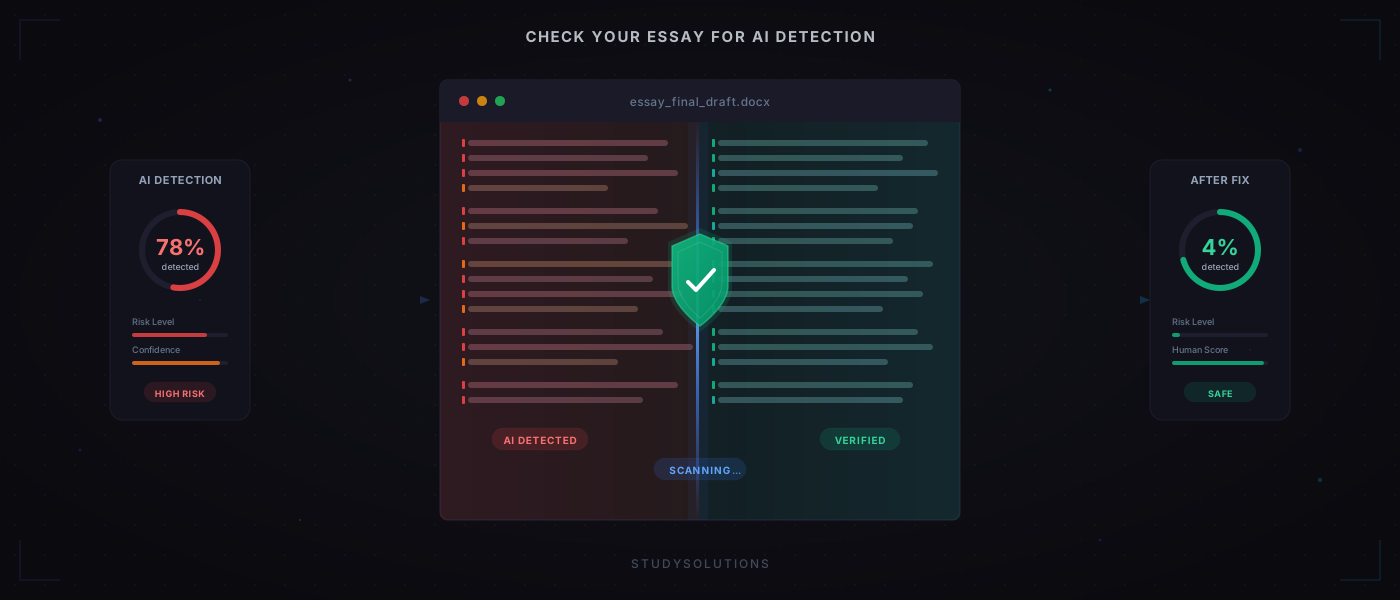
5-Step
Check-Fix-Recheck Loop
Free
AI Detection Report
<60s
Scan Time
92%→3%
Tested Score Drop
If you have ever used ChatGPT, Claude, or any AI writing tool to draft an essay, your next move should be to check your essay for AI detection before turning it in. Turnitin AI detection is now standard at most universities, and a high score can trigger academic integrity proceedings — even for students whose work is mostly original. This guide walks you through exactly how AI detection checkers work, how to scan your essay yourself, how to read the results, and how to fix flagged sections before your professor ever sees them.
What Is AI Detection and Why It Matters
The Rise of AI Detection in Academia
Universities worldwide have integrated AI content detection tools into their submission workflows alongside traditional plagiarism scanners. Turnitin AI detection is now active on most institutional accounts, scanning every essay, report, and assignment for both plagiarism and AI detection signals. The consequences of a high AI score range from grade penalties to formal academic integrity proceedings.
This is not limited to ChatGPT. Modern detectors flag content from GPT-4, Claude, Gemini, and every other large language model. If you used any AI writing tool during your drafting process, your submission could trigger detection. The only way to know for certain is to check your essay for AI detection before your professor does.
Why Legitimate Writers Get Flagged
AI detectors analyze writing patterns, not intent. They cannot tell whether you wrote every word yourself or pasted output from ChatGPT. What they measure is how statistically predictable your text is. The problem is that common writing styles, formulaic academic prose, and ESL patterns can all trigger false positives.
Students who outline with AI and then write original text may still see elevated scores. Students who happen to write in a structured, methodical style may get flagged despite never touching an AI tool. The only way to know where you stand is to run a scan before submitting. For a deeper look at how Turnitin specifically works, see our guide on how to beat Turnitin AI detection.
How AI Detection Tools Work
To interpret your detection results, it helps to understand what AI writing detectors actually measure. Tools like Turnitin, GPTZero, and Originality.ai all rely on the same core signals. Think of them as a writing fingerprint analyzer: they do not read for meaning, they read for statistical patterns.
Perplexity: How Predictable Is the Text?
Perplexity in plain terms
Perplexity measures how surprised a language model is by the next word in a sentence. Low perplexity means predictable text — typical of AI. High perplexity means unexpected choices — typical of human writing.
AI-generated text is built by predicting the most likely next word at every step. The result is statistically smooth. A Turnitin-powered AI generated text checker exploits this by feeding each sentence into its own model and measuring how easy the next word is to guess. If the whole essay is easy to predict, the AI score climbs.
Burstiness: Sentence Length Variation
Burstiness in plain terms
Burstiness measures how much sentence length varies. AI text uses uniformly medium-length sentences. Human text swings between short fragments and long complex clauses.
Read any ChatGPT essay and you will notice a rhythm: every sentence lands between 15 and 25 words. Humans do not write like that. A real essay mixes three-word sentences with forty-word ones. Detectors measure this variation and flag uniformity as AI.
Turnitin vs. Other Detectors
Why Turnitin matters most
Turnitin is what your professor sees. A pass on GPTZero does not guarantee a pass on Turnitin. Checking with a Turnitin-powered tool means you see the same results your institution will see.
Different detectors use different models and produce different Turnitin AI scores for the same text. GPTZero might say 20% while Turnitin says 35%. If your school uses Turnitin, the only way to know what your professor will see is to check your essay for AI detection with a Turnitin-powered tool first. The StudySolutions AI Report uses the same Turnitin engine your institution runs — same scores, same sentence-level highlighting, no surprises.
Step-by-Step: Check Your Essay Before Submitting
Here is the exact workflow for AI detection before submission. Whether you wrote your essay with ChatGPT, Claude, or any other tool, these five steps let you check your essay for AI detection, fix any issues, and re-check — a complete essay AI checker before submitting.
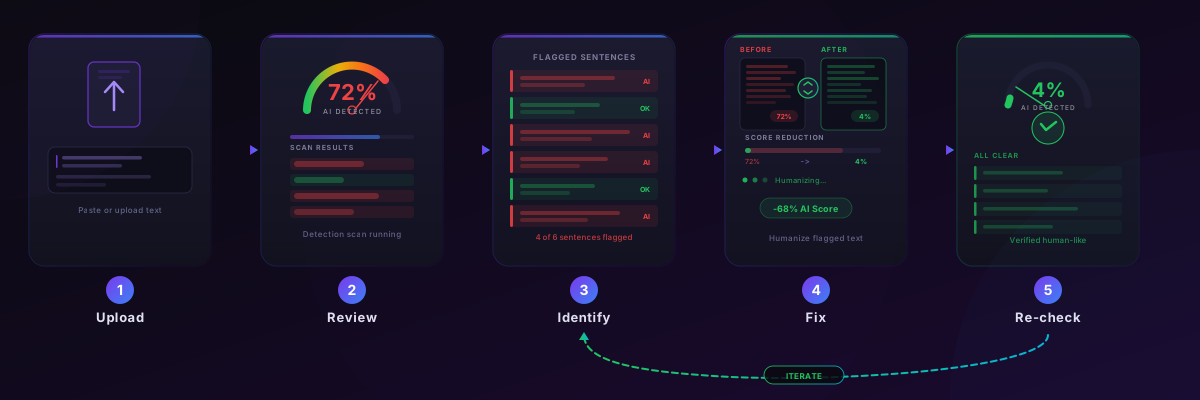
Step 1: Upload Your Essay
Go to the AI Report tool and upload your essay. Supported formats are PDF and DOCX (up to 25 MB). The upload takes seconds, and scanning begins immediately.
Step 2: Review Your AI Detection Score
You will receive a Turnitin-grade report with an overall AI percentage and sentence-level highlighting. Every sentence that triggered detection is marked, so you can see exactly where the issues are — not just a single number.
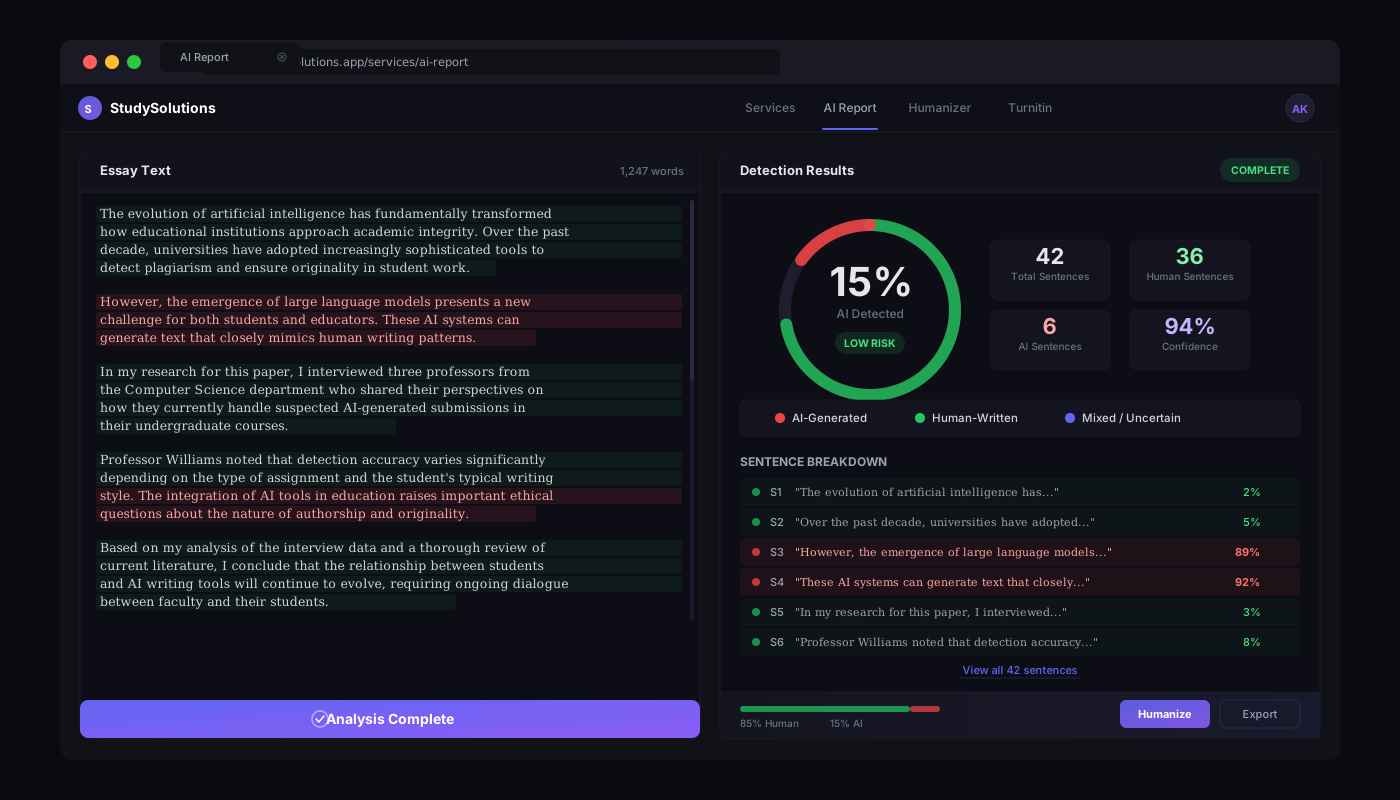
Step 3: Identify Flagged Sections
Focus on the highlighted sentences. Not every flagged sentence needs rewriting — what matters is clusters. A few isolated flagged sentences in a long essay may be acceptable. A flagged paragraph in a short essay is more concerning.
Check whether flagged sections are actually AI-generated or false positives. If you wrote a section entirely yourself and it is flagged, you may want to rewrite it anyway to avoid questions from your professor.
Step 4: Fix Flagged Content
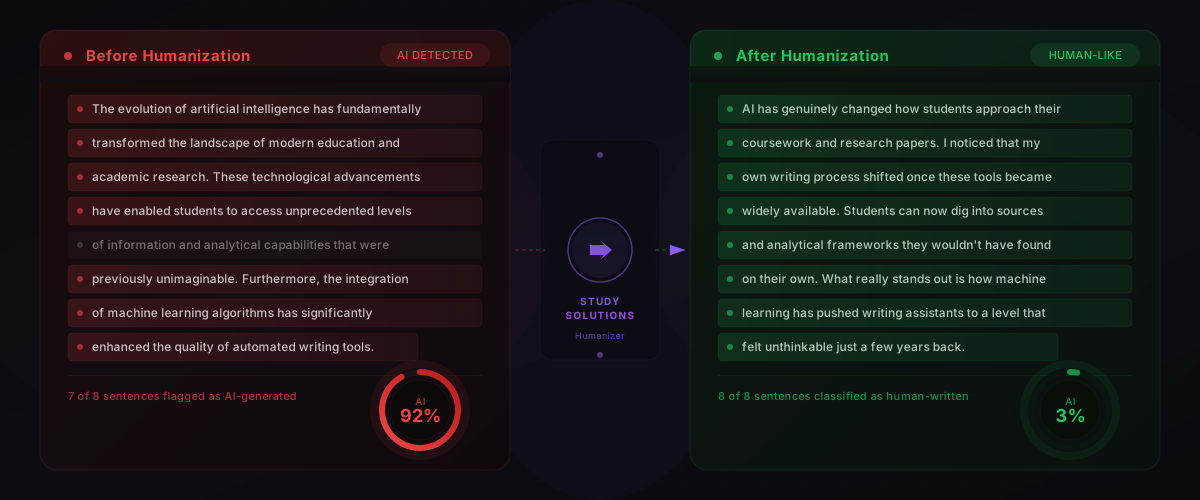
Use the AI Humanizer to rewrite flagged sections. The streaming rewrite shows changes happening sentence by sentence in real time, and a before/after AI score comparison confirms the improvement.
Pro tip: run the humanizer on flagged sections only, not the entire essay. This preserves your authentic voice in clean sections while fixing only what needs attention.
Step 5: Re-Check and Submit with Confidence
Upload the revised essay for a second scan. Verify the score improvement. If clusters remain, repeat Steps 3-5. Most students see significant score reduction after a single round. Once you are satisfied, submit knowing your essay reads as original work.
Understanding Your AI Detection Score
What the Percentages Mean
Generally Safe
Most institutions consider this range acceptable. Minimal risk of triggering a review.
Caution Zone
May trigger a manual review. Worth fixing flagged sections before submitting.
High Risk
Likely to be flagged for an academic integrity investigation. Address flagged sections before submitting.
Keep in mind that every institution sets its own thresholds. These ranges are general guidance, not guarantees. When in doubt, aim lower.
Sentence-Level vs. Overall Score
The overall percentage is an aggregate, but professors also see sentence-level highlighting. A few flagged sentences scattered across a long essay may not raise concerns. A dense cluster of flagged sentences in a single paragraph is much more conspicuous.
Focus on reducing clusters, not on achieving an absolute 0%. A natural essay with a 5% AI score and no visible clusters is stronger than one that has been over-processed to hit 0% but reads stiffly.
Why Scores Differ Between Tools
Different AI writing detectors use different models. GPTZero might report 20% while Turnitin reports 35% for the exact same text. If your institution uses Turnitin, always check if your essay is AI generated with a Turnitin-powered tool. That way there are no surprises when your professor opens the report.
How to Lower Your AI Detection Score
Manual Techniques
Add personal anecdotes and specific examples from your own research or experience.
Vary sentence length deliberately. Mix short punchy sentences with longer analytical ones.
Use discipline-specific terminology and cite specific sources rather than speaking in generalities.
Restructure AI-generated outlines into your own organizational logic. Change the order of arguments.
Read your work aloud. If a section sounds robotic or formulaic, revise those sentences.
Tool-Powered Remediation
Manual techniques help when you want to detect AI writing in your essay and fix it by hand, but they are time-consuming and imprecise. For faster results, the StudySolutions AI Humanizer rewrites flagged sections by transforming the linguistic patterns that trigger detectors. It preserves meaning while changing the statistical fingerprint — the same perplexity and burstiness signals that detectors measure.
Real-time streaming shows the rewrite happening sentence by sentence. Before/after scoring confirms whether the rewrite actually reduced the detection score. No guesswork.
For a detailed walkthrough of how humanization works at the NLP level, see our guide on how to humanize AI text and bypass AI detection.
The Check-Fix-Recheck Loop
Best practice: iterate, do not submit after one check
Check your essay. Identify flagged sections. Fix them manually or with the humanizer. Re-check. Most students see significant improvement after one round. Repeat if needed until you are satisfied with the score.
The loop is what separates a quick scan from a thorough pre-submission workflow. Other tools stop at detection. StudySolutions completes the loop: check, fix, re-check, submit.
Frequently Asked Questions
Check Your Essay Now — Before Your Professor Does
Scan your essay with a Turnitin-powered AI detection checker, identify flagged sections, fix them with the AI Humanizer, and submit with confidence. Free to start — no credit card required.